


SMS Compliance for Google Sheets: The Complete Guide with Opt‑In Templates and a Free Consent Ledger
A single missed opt-out can expose a campaign to enforcement under SMS regulations, TCPA, CAN-SPAM, and cost organizations thousands in fines. SMS compliance is a set of federal rules that require documented consent, clear opt-outs, and honest sender identification. This best-practices guide explains step-by-step compliance for sending bulk SMS from Google Sheets and includes opt-in/opt-out templates plus a free consent ledger. Sheet Gurus SMS is a Google Sheets add-on that sends messages from a sidebar (not spreadsheet formulas), supports curly-bracket variables like {first_name}, provides a real-time inbox for two-way replies, and applies automatic message filtering to help maintain compliance. Find related resources on our blog. You will also see the exact opt-in wording and a {consent_date} ledger sample that legal teams often request.
What are the core TCPA and CAN-SPAM rules that affect text messaging from Google Sheets?
TCPA and CAN-SPAM set different rules that can both affect SMS campaigns you send from Google Sheets. TCPA controls required consent for automated promotional texts, while CAN-SPAM contributes transparency and opt-out principles that apply when messages carry commercial content. Use this section to decide which law governs a message and to build opt-in flows and a consent ledger that stand up to audit.
What is TCPA and what does it require for SMS? 📱
The TCPA is a federal statute that requires prior express written consent before sending promotional automated text messages. Prior express consent means the recipient agreed to receive messages at the phone number provided; prior express written consent adds specific disclosure language and a signature when the texts are promotional. For SMS sent from Google Sheets, promotional examples include sale alerts, marketing blasts, and automated reminders that advertise products or services. Transactional messages such as appointment confirmations or payment receipts typically do not need written consent but still require clear sender identification and an opt-out pathway.
Required written-consent elements generally include the seller’s identity, a description that the recipient will receive automated marketing texts, the phone number used, and an unambiguous affirmative action (for example, checking a box or texting YES). Sheet Gurus SMS helps by storing consent timestamps and by applying automatic message filtering so you only send promotional blasts to numbers with recorded written consent.
💡
Tip: Always record the exact opt-in text, timestamp, and originating phone number in your consent ledger before sending promotional messages.
Example opt-in capture (use in a web form or confirmation SMS):
“Reply YES to opt into {{campaign_name}} from {{business_name}} at {{phone}}. Msg frequency varies. Reply STOP to opt-out.”
What is CAN-SPAM and when does it apply to messaging? ✉️
CAN-SPAM is a federal law that governs commercial email but its honesty and opt-out requirements inform SMS best practices when messages are commercial in nature. CAN-SPAM focuses on accurate sender info, truthful subject lines (or equivalent content), and a clear, functioning opt-out mechanism. For SMS, CAN-SPAM principles are relevant when the message carries advertising or promotional content even though TCPA controls whether you had proper consent for automated delivery.
Practically, this means your SMS should identify the business, avoid misleading content, and provide an easy way to stop future messages (for example: “Reply STOP to opt-out”). Sheet Gurus SMS supports those needs by letting you include dynamic sender fields ({{business_name}}) in every message, by logging opt-out replies in real time, and by applying filters that prevent sending to numbers that have replied STOP.
Regulatory overlap: TCPA decides whether you had the right to send an automated promotional SMS; CAN-SPAM-style rules guide message content and the adequacy of opt-out functionality. Follow both sets of rules when your campaign advertises goods or services.
Side-by-side matrix: When TCPA applies versus CAN-SPAM (table)
Use this matrix to decide whether TCPA or CAN-SPAM primarily governs a given message based on content, consent, and delivery method.
| Factor | TCPA | CAN-SPAM (applies by analogy to SMS) |
|---|---|---|
| Primary scope | Calls and automated texts; focuses on consent for autodialed/promotional messages. | Commercial email rules; informs transparency and opt-out expectations for commercial SMS. |
| Trigger for applicability | Message is autodialed or uses automated system and promotes products/services. | Message contains commercial/promotional content regardless of delivery channel. |
| Consent type required | Prior express consent for informational SMS; prior express written consent for promotional automated SMS. | No statutory consent requirement for email, but best practice requires opt-in or clear disclosure if used for commercial outreach. |
| Typical penalties | Private lawsuits and statutory damages per violation, plus FCC enforcement risk. | FTC enforcement for deceptive practices and potential agency actions; no direct CAN-SPAM statutory damages for SMS but content violations increase enforcement risk. |
| Practical example | “Flash sale: 20% off—reply YES to opt in.” Sent via Sheet Gurus SMS only after recorded written consent. | “New collection launch at {{business_name}}—reply STOP to opt-out.” Content must be truthful and include opt-out. |
| Opt-out requirements | Must honor opt-out promptly; TCPA suits often focus on failure to stop messages. | Must provide and honor a clear opt-out that actually stops commercial contact; record opt-out events. |
| Record-keeping | Maintain consent records, timestamps, and how consent was collected. | Keep copies of message content, sender identification, and opt-out records for audits. |
If you still need help matching a message to the right rule, consult our step-by-step setup in the
Guide: Sending SMS from Google Sheets with Sheet Gurus SMS [Updated 2025].Key definitions 🔑
These definitions explain the core compliance terms you will reference when building opt-in flows and an audit-ready consent ledger.
Prior express consent is a legal permission that a consumer gives to receive non-promotional calls or texts at a specified phone number. Prior express consent usually results from the consumer giving the phone number for a transactional purpose, for example, providing a number to receive shipping alerts.
Written consent is a documented permission that is signed or recorded and that includes clear disclosures that the recipient will receive automated promotional texts. For SMS, written consent typically requires the name of the business, acknowledgement that messages will be automated and promotional, the phone number to be messaged, and the consumer’s affirmative action (for example, checking a box or sending an SMS reply).
ATDS is equipment that can store or produce telephone numbers to be called, using a random or sequential number generator, and that can dial those numbers automatically; explained for non-technical users, it means systems that can send large numbers of texts automatically. Sheet Gurus SMS sends messages from a sidebar and documents whether a message was sent manually or by an automated campaign to help you demonstrate whether ATDS rules apply.
Transactional message is a message that conveys information about an existing transaction or account and is not primarily promotional. Examples include order confirmations, appointment reminders, and shipping updates; these messages generally require a lower consent threshold but must still honor opt-outs.
Commercial message is a message that advertises or promotes a product, service, or business. Commercial messages usually trigger the stricter TCPA written-consent standard when sent using automated systems.
Which opt-in, opt-out, and recordkeeping practices should small businesses use for bulk SMS from Google Sheets?
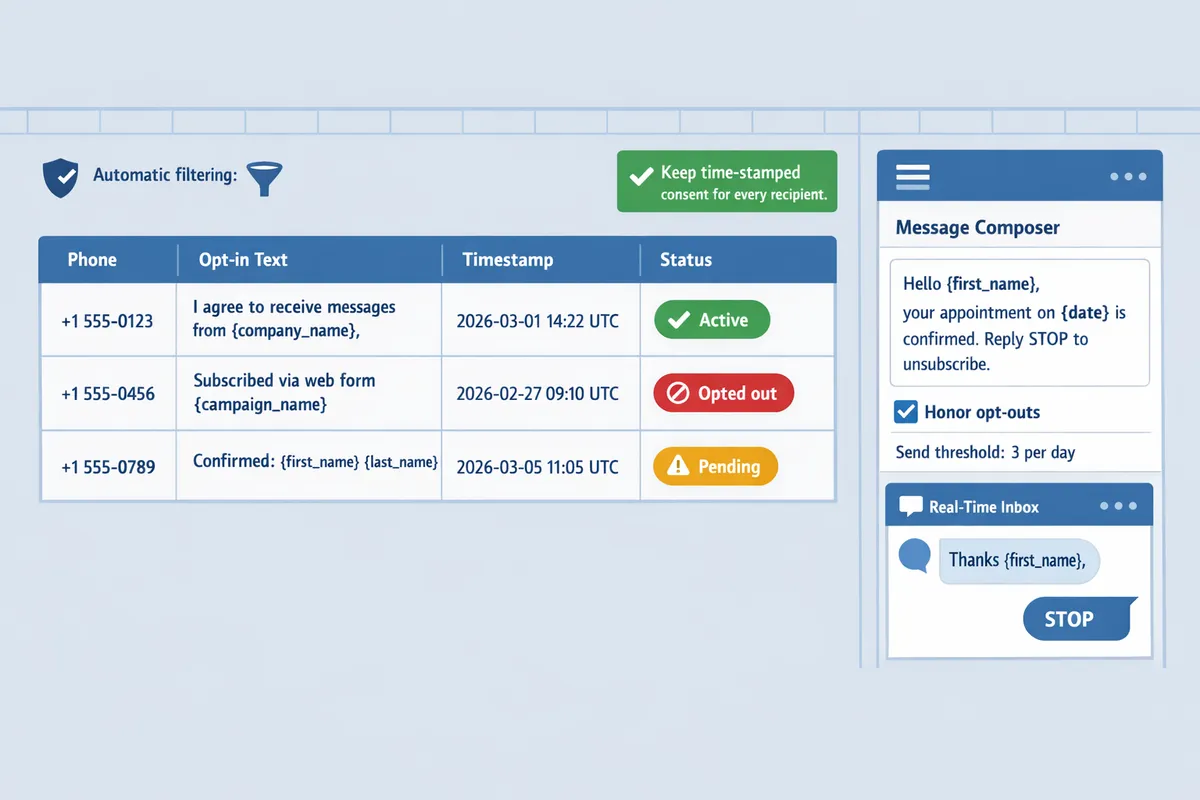
Capture explicit, recorded consent, provide an immediate opt-out method, and keep a time-stamped consent ledger for every recipient. These three practices reduce audit exposure, cut manual work, and let you send bulk SMS from Google Sheets with defensible documentation. Below are ready-to-copy opt-in and opt-out templates, a free Google Sheets ledger blueprint, and step-by-step instructions for moving ledger rows into Sheet Gurus SMS.
Opt-in language templates for promotional and transactional messages 📋
Opt-in copy must state the message purpose, sender, frequency, and how to opt out in one short line. Use curly-brace variables (for example {first_name} and {account_number}) so your sign-up flows match the messages you will actually send with Sheet Gurus SMS. Below are concise templates you can paste into web forms, checkout flows, or in-person signups.
Promotional opt-in (web checkbox): “Yes, I want offers and updates from {company_name} via SMS at {phone}. Msgs up to 4/mo. Reply STOP to cancel.”
Transactional opt-in (order confirmations): “Text alerts for order #{account_number} to {phone} for shipping and delivery only. Reply STOP to opt out.”
Inline checkbox copy (pre-submit): “Receive appointment reminders and account alerts from {company_name}. Reply STOP to opt out.”
Place opt-in text next to the final submit button and require an unchecked box the user must check. Use the Sheet Gurus SMS sign-up examples in the Guide: Sending SMS from Google Sheets with Sheet Gurus SMS [Updated 2025] to mirror message text exactly.
Opt-out templates and required reply handling 🔁
Opt-out flows must let recipients stop messages immediately using a simple keyword and you must cease sends to that number as soon as the request is received. The industry standard single keyword is STOP; use Sheet Gurus SMS’s real-time inbox and automatic message filtering to detect STOP and block further sends.
Sample automatic replies you can configure in Sheet Gurus SMS sidebar:
- Immediate confirm: “You are unsubscribed from {company_name}. No more messages will be sent. Reply HELP for support.”
- HELP auto-reply: “For support, call {support_phone} or email {support_email}. Msg frequency: {frequency}.”
Handle follow-up replies by logging the original STOP and ignoring subsequent marketing sends. If a recipient texts STOP and later texts HELP, honor the HELP response for support only; do not resume promotional sends without a fresh opt-in. Delaying or missing opt-outs risks FTC/FCC complaints and private suits, plus higher carrier filtering rates.
⚠️ Warning: Stop sends immediately on a STOP request. Even short delays increase audit risk and complaint volume.
Sheet Gurus SMS lets you set automated STOP handling and confirmation messages to remove manual bottlenecks—see the import and inbox features in our product guide for setup details.
How to build and use a consent ledger in Google Sheets (free template) 🧾
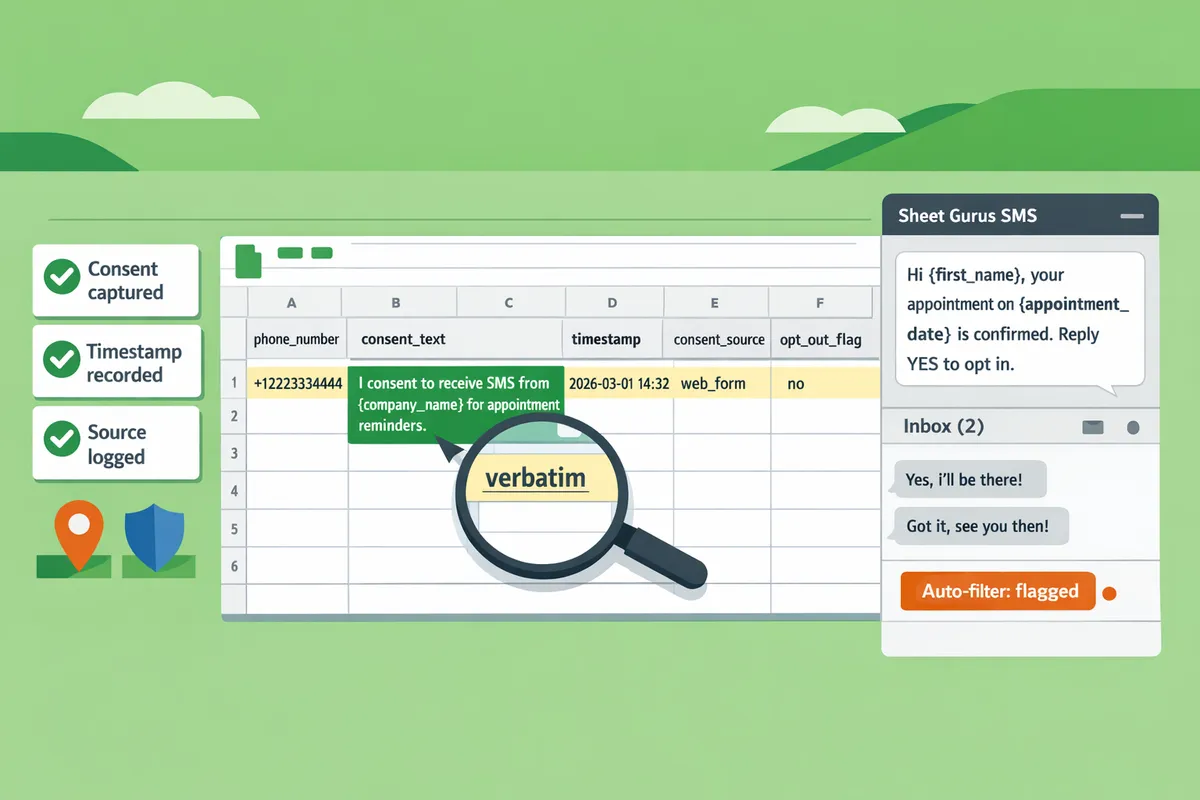
A consent ledger is a time-stamped Google Sheet that records each opt-in event, its source, and proof auditors require. Use the free consent ledger template our website provides and keep the ledger as the canonical source of truth for any audit or dispute.
Minimum fields to survive audits (add others as available):
- phone_number (E.164 format, e.g., +12223334444)
- consent_text (exact wording shown to user)
- timestamp (ISO 8601 when consent was captured)
- consent_source (web form, in-store, SMS keyword)
- message_id or consent_reference (ID from Sheet Gurus SMS or form)
- opt_out_flag (yes/no) and opt_out_timestamp
How to use the ledger with Sheet Gurus SMS:
- Collect consent via web form or checkout and write a row into the ledger immediately.
- Import the ledger CSV into Sheet Gurus SMS or use the sidebar import to map columns to contact fields.
- Configure Sheet Gurus SMS to block sends to rows where opt_out_flag = yes.
- Keep an immutable copy (download monthly) for audits.
💡 Tip: Record the exact consent_text shown to users. Auditors and regulators focus on verbatim language, not paraphrase.
Download the free ledger template and setup steps in the Sheet Gurus SMS import guide to reduce manual work and ensure your ledger maps cleanly to the platform.
State and sector variations to watch for ⚖️
State laws and industry rules can add consent obligations or higher penalties on top of federal TCPA and CAN-SPAM rules. Track state nuances and industry constraints so your Google Sheets program does not rely on federal rules alone.
Key markers by sector and what to do:
Retail and ecommerce: watch for state consumer privacy laws that affect data use and opt-out requests; keep opt-in provenance in the ledger and use Sheet Gurus SMS to segment suppression lists. See practical use cases in Sheet Gurus SMS for Ecommerce.
Healthcare: avoid sending protected health information by SMS unless you have explicit patient authorization and appropriate safeguards; record written consent and consult counsel before marketing via text.
Political messaging: political and issue-advocacy texts often trigger stricter consent and disclosure rules; capture granular consent (topic, candidate, or issue) and retain signed records.
Financial services: follow sector-specific disclosure obligations under GLBA and record the consent channel and text shown to the customer.
When sector or state rules are unclear, flag the contact for legal review and keep the ledger entry marked as “pending review” rather than assuming compliance. State-by-state detail changes frequently; our blog updates and the Guide: Sending SMS from Google Sheets with Sheet Gurus SMS [Updated 2025] cover recent guidance and implementation notes.
How do you implement and measure compliant bulk SMS campaigns from Google Sheets using Sheet Gurus SMS?
Implement compliant bulk SMS from Google Sheets by mapping consent fields, running staged test sends via the Sheet Gurus SMS sidebar, enabling automatic compliance filtering, and exporting audit logs for review. This workflow reduces manual reconciliation and creates a defensible trail for SMS regulations, TCPA, and CAN-SPAM audits. The steps below show exact column mappings, a send template example with curly-brace variables, the testing checklist, monitoring cadence, and the metrics to export.
Step-by-step setup in Google Sheets with Sheet Gurus SMS 🧩
Set up Google Sheets by creating a consent ledger table and mapping each column to Sheet Gurus SMS fields before sending. Consent ledger is a record table that timestamps opt-ins, records the opt-in source, and stores the consent copy tied to each phone number. Follow these steps.
- Create these columns in your sheet: phone_number, first_name, consent_status (values: opted_in, revoked), consent_timestamp, opt_in_source, consent_copy, last_send_status, reply_log. Map each header to Sheet Gurus SMS fields in the add-on sidebar.
- Use curly braces for dynamic text: write messages with {first_name}, {order_id}, or {consent_timestamp} so Sheet Gurus SMS substitutes values at send time.
- Add a consent_check column formula (visible to reviewers only) that verifies consent_status = “opted_in” before a row is eligible.
- Open the Sheet Gurus SMS sidebar (messages are sent via a sidebar, not spreadsheet formulas), select the mapped columns, and enable the send flow that requires confirmation for rows without recent consent_timestamp.
- Example send template (include consent verification line): “Hi {first_name}, your order {order_id} has shipped. Reply STOP to opt out. Consent recorded: {consent_timestamp} via {opt_in_source}.”
Refer to the Sending SMS from Google Sheets guide for detailed setup steps and screenshots.
Configuring automatic compliance filtering for bulk texting campaigns ⚙️
Enable and tune Sheet Gurus SMS automatic compliance filtering to block flagged keywords, respect opt-outs, and prevent sends to revoked numbers. Sheet Gurus SMS automatic message filtering for bulk texting campaigns scans content and recipient status before each send and flags rows that need review. Configure these points:
- Enable keyword filters and pick the sensitivity level for promotional versus transactional language.
- Turn on the opt-out enforcement toggle so any consent_status other than “opted_in” is skipped automatically.
- Add a revoke-list import to block numbers that carriers or legal teams supply.
Filtering reduces manual review time by only surfacing rows with issues. For a full walkthrough of list hygiene best practices, see our post on Harnessing the Power of Google Sheets for SMS Communication.
Testing, inbox monitoring, and two-way reply handling 📬
Run staged test sends, monitor the real-time inbox, and define escalation steps for STOP/HELP replies before launching a bulk campaign. Use this pre-launch checklist:
- Send three variations to internal test numbers: (a) plain text, (b) dynamic variables, (c) messages containing links. Confirm variable substitution and link formatting.
- Confirm the sidebar records the send status and writes last_send_status back to the sheet for each test row.
- Test STOP and HELP flows to ensure Sheet Gurus SMS flags the reply and updates consent_status to revoked.
💡 Tip: Always use double opt-in for high-risk lists; confirm initial opt-in via SMS so consent_timestamp reflects an affirmative action.
Monitoring cadence and escalation: check the real-time inbox at campaign launch hourly for the first 6 hours, then every 4–8 hours while the campaign runs. If a STOP is received and not processed within 60 minutes, escalate to the campaign owner; if multiple STOPs arrive within an hour, pause the campaign and audit the consent ledger. Missed two-way messages create customer service failures and increase carrier complaints, which can lead to blocked numbers and lost revenue.
Measurement and audit logs: what to track and export 📊
Export consent records and send logs to prove compliance during audits. Track and export these fields from both Google Sheets and Sheet Gurus SMS:
- phone_number
- consent_status
- consent_timestamp
- opt_in_source (web form, in-store, phone)
- consent_copy (the exact language the user agreed to)
- last_send_status (sent, queued, failed, blocked)
- delivery_timestamp and carrier response when available
- reply_log and timestamps for STOP/HELP and other replies
Generate CSV exports of the consent ledger and the message send log before and after each major campaign. Those exports create a time-stamped audit trail that reduces legal risk and speeds responses to regulator inquiries. See our guide on Sending SMS from Google Sheets with Sheet Gurus SMS for the export steps.
Common pitfalls and risk-cost examples ⚠️
DIY mistakes like stale consent records, missing opt-out processing, or sending from unmanaged lists create costly follow-up work and operational risk. Typical consequences include hours spent reconciling consent across platforms, temporary carrier blocks when complaint volume rises, and enforcement actions for TCPA or CAN-SPAM violations.
Example scenarios:
- Reconciliation overhead: a marketing team spends 20–40 hours reconciling mismatched consent timestamps after a campaign because the ledger lacked an opt_in_source column.
- Missed opt-outs: failing to process STOP replies in real time can trigger carrier complaints that lead to message filtering or suspension until the list is remediated.
- Lost revenue: blocked promotional traffic during peak sales windows stops conversions and requires manual appeals to carriers.
Sheet Gurus SMS automation cuts those hours by enforcing opt-out rules at send time, updating consent_status automatically from the real-time inbox, and keeping a single exportable ledger tied to each message. For use case examples and industry-specific guidance, check Sheet Gurus SMS for Ecommerce and our post on Effortless SMS Blasts for Effective Communication.
Frequently Asked Questions
This FAQ answers the most common compliance questions about TCPA, CAN-SPAM, consent records, and sending bulk SMS from Google Sheets. Use these concise, actionable answers to reduce legal risk, prepare for audits, and map requirements into your Sheet Gurus SMS workflow.
Do CAN-SPAM rules apply to SMS messages? 📩
CAN-SPAM is an email law and does not directly regulate SMS messages. CAN-SPAM principles—clear sender identity and an easy unsubscribe—remain useful for mixed-channel programs because following them reduces confusion and cross-channel complaints. For SMS, rely primarily on TCPA consent rules and the FCC guidance, but include a visible sender name or company in the first line of every message to reduce recipient confusion. For example: “Hi {first_name}, this is {company_name}. Reply STOP to opt out.” Use Sheet Gurus SMS to insert {company_name} and {first_name} dynamically and keep message text consistent across sends.
What consent is required for promotional text messages? ✅
Promotional automated texts require prior express written consent under the TCPA. Express written consent means a clear disclosure of marketing purposes plus an affirmative consumer action (for example, checking a box or submitting a form) that is retained for audit. Use our promotional opt-in template and capture the exact consent language, timestamp, and source in your ledger. Example web opt-in language you can store: “I agree to receive recurring promotional texts from {company_name} at the number provided. Msg & data rates may apply. Reply STOP to cancel.” Link that capture form directly to your Google Sheet and run Sheet Gurus SMS compliance filtering before any bulk send.
Can I send SMS from Google Sheets without explicit opt-in? 🚫
No. Sending automated, promotional bulk SMS without documented consent exposes you to TCPA claims and potential fines. Manual one-off messages to people with an existing business relationship may be a different legal scenario, but bulk sends require recorded consent. To avoid accidental sends, follow this checklist: 1) import only rows where the “consent_flag” column equals TRUE; 2) run Sheet Gurus SMS automatic compliance filtering in the sidebar; 3) do a staged test send to a small consented list before full blast. Failing to confirm consent costs hours in dispute resolution and creates litigation risk.
How fast do I have to honor STOP requests? ⏱️
You must stop sending messages to a recipient immediately after a valid STOP request. The FCC expects prompt processing; industry practice allows a single opt-out confirmation message but no further marketing messages. Track STOP events in your consent ledger and enable Sheet Gurus SMS automatic filtering to block that number from future sends. Example opt-out confirmation: “You will no longer receive messages from {company_name}. Reply HELP for support.”
⚠️ Warning: Do not send promotional follow-ups after an opt-out even if you believe they are transactional. Continuing to send marketing messages after STOP can lead to enforcement.
Does state law affect my SMS program? 📍
Yes. Several states impose higher consent standards, additional disclosures, or separate do-not-call rules that sit alongside federal law. Tag each consent record with the recipient’s state to apply state-specific rules during segmentation and to simplify audits. Use the state column in your Google Sheets ledger to filter lists before sending targeted promotions. See our state-by-state checklist in the guide to identify requirements that matter for ecommerce or other regulated sectors, and review relevant entries on the Sheet Gurus blog for examples of state-level updates.
What fields should my consent ledger store for audits? 🗂️
At minimum, your consent ledger must record phone number, the exact consent text used, timestamp, opt-in source, and any revocation events. Add these recommended columns:
- phone_number
- consent_text (exact phrasing captured at opt-in)
- consent_timestamp (ISO format)
- opt_in_source (web form, paper form, in-person)
- state or jurisdiction
- capture_user_id or campaign_id
- revocation_timestamp and revocation_method
- file or form reference (link to original agreement)
Numbered audit checklist:
- Export the ledger as a read-only CSV and store with access logs.
- Cross-check the campaign_id in the ledger against the exact message template used.
- Produce the ledger slice to regulators within the time required by subpoena or inquiry.
💡 Tip: Always use double opt-in for high-risk campaigns (signup + confirmation SMS) and record both timestamps in the ledger.
You can use our free Google Sheets consent ledger template to implement the exact column layout and import it directly into Sheet Gurus SMS for compliance filtering and staged sends. For step-by-step setup, follow our Guide: Sending SMS from Google Sheets with Sheet Gurus SMS [Updated 2025] and check examples on the Sheet Gurus blog.
For sector-specific best practices, see Sheet Gurus SMS for Ecommerce and the use-case playbook in Effortless SMS Blasts for Effective Communication.
Final steps to keep your SMS program compliant.
Follow documented consent, clear opt-out language, and automatic filtering to reduce legal and revenue risk; keeping records in one place simplifies audits and disputes. For example, a consent ledger tied to your send list prevents accidental messaging to opted-out numbers and shortens dispute resolution time.
Sheet Gurus SMS is a platform that helps users save time and money by enabling them to send bulk SMS to their recipients easily from within Google Sheets. The product is a Google Sheets add-on and messages are sent via a sidebar not via spreadsheet formulas. The product has the following features:
- Text messages can be sent with curly brackets as variables to allow for dynamic content.
- A real time inbox to allow for two way communication with recipients.
- Automatic message filtering to keep users compliant with regulations.
💡 Tip: Use double opt-in and include a sample dynamic message like “Hi {first_name}, reply STOP to opt out” so your ledger and sends stay aligned.
Download the free consent ledger and the bulk sms compliance opt-in opt-out templates google sheets consent ledger from our getting-started guide to begin. For broader SMS Compliance reading, see our blog and the guide on sending SMS from Google Sheets, plus best practices for blasts in our SMS Blasts article.