




SMS Compliance for Google Sheets in 2026: TCPA, 10DLC, GDPR/CCPA, and Automatic Message Filtering Explained
A single carrier filter can silence thousands of scheduled texts and turn a campaign into lost engagement.
Message filtering sms marketing is a carrier and platform process that blocks or flags SMS based on content, consent status, and sending patterns.Our Sheet Gurus SMS Google Sheets add-on sends bulk SMS from a sidebar, supports curly-brace variables like {{first_name}} and {{appointment_date}} for personalization, and includes a real-time inbox plus automatic message filtering.
This guide explains how carrier and platform rules affect deliverability, links to our Google Sheets SMS blasting workflow and automated SMS messaging, and provides compliance-ready templates and pre-send checks.
Example: ‘Reminder: {{first_name}}, your appointment is on {{appointment_date}} at {{location}}.’
Which filter triggers block messages and which simple Google Sheets checks prevent them?
What is message filtering and why does it matter for SMS marketing?
Message filtering is a set of carrier and platform rules that score and block SMS based on sender identity, message content, consent signals, and recipient behavior. Carriers and platforms apply these rules before a message reaches a handset, so filtering directly affects deliverability, complaints, and campaign ROI. For Google Sheets senders, understanding which signals matter lets you store the right evidence and avoid sudden blocks when sending from a Sheet.
What is message filtering? 🧭
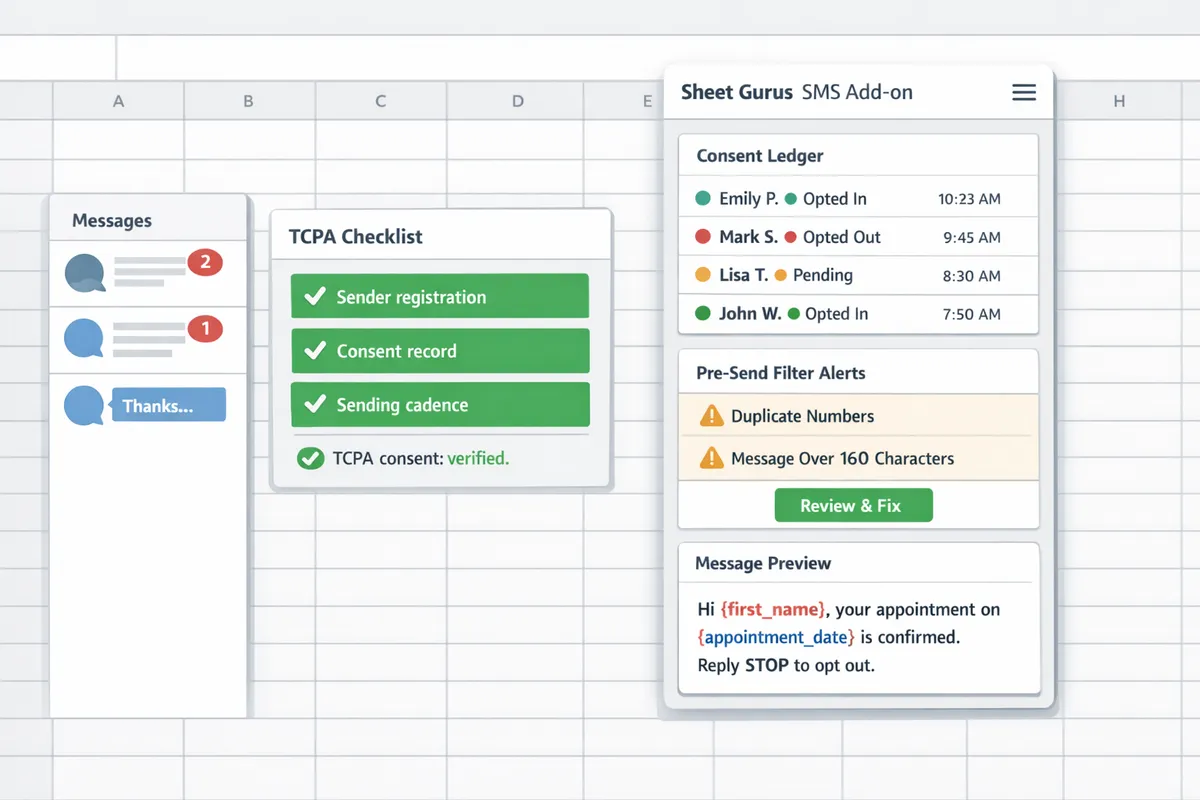
Message filtering is a classification system that flags and blocks SMS content and senders based on policy, format, and recipient feedback. Many carriers combine automated content analysis, sender registration status, complaint and opt-out rates, and historical sending patterns to decide whether to deliver, route to a spam folder, or reject a message. For example, identical messages to thousands of numbers without proper registration or clear opt-in language commonly trigger higher scrutiny. Sheet Gurus SMS applies automatic message filtering before dispatch and surfaces the reason for any hold in the sidebar so you can correct consent records or edit content in the Sheet.
How do carrier-level filters differ from platform-level filters? 🛣️
Carrier-level filters operate at the network level applying registration, throughput caps, and routing policies, while platform-level filters enforce account trust, billing, and consent rules. Carriers in the U.S. will check 10DLC registration and may throttle or reject traffic that exceeds permitted throughput or appears spoofed. Platforms, including Sheet Gurus SMS, will block messages that violate terms of service, show sudden spikes, or fail pre-send checks against your consent ledger. When troubleshooting rejections, compare carrier rejection codes with the add-on’s pre-send alerts to tell whether you need a registration change, list clean-up, or corrected consent evidence.
Which regulatory signals influence filtering decisions? ⚖️
Regulatory signals such as TCPA opt-in proof, 10DLC registration, GDPR lawful basis, and CCPA data-handling disclosures influence carrier and platform scoring. In the U.S., a documented opt-in and the correct 10DLC campaign type reduce carrier blocking; missing opt-in dates or unclear opt-out language increases the risk of throttling. In the EU, carriers and platforms treat GDPR lawful-basis documentation and limited data retention as compliance signals, so store the lawful-basis column and timestamps in your Sheet. For California recipients, clearly documented data access and deletion processes lower dispute risk. Sheet Gurus SMS integrates pre-send checks that compare your Sheet’s consent columns against message templates and will flag entries missing a date-stamped opt-in.
💡
Tip: Always use double opt-in for SMS signups to produce a date-stamped confirmation you can keep in Google Sheets. This reduces disputes and gives carriers clearer consent evidence.
For a practical checklist that shows which registration and consent fields to record in your Sheet and how Sheet Gurus SMS enforces them, see our Automatic compliance filtering TCPA checklist for Google Sheets senders. For examples of automated workflows that keep consent and content aligned, see our automated SMS messaging workflows.
How can marketers reduce message-filtering risk and improve deliverability?
Marketers reduce message-filtering risk by aligning sender registration, consent records, message content, and sending cadence with carrier and platform policies. Carriers and platform filters score every message against sender identity, content signals, and consent before delivery. The practical result: correct registrations, clean consent ledgers, conservative content, and staged testing keep campaign throughput steady and reduce costly rejections.
Optimize sender identity and register 10DLC correctly 📨
Correct sender identity and 10DLC registration prevent carrier scoring that increases rejections and throughput limits. 10DLC is a carrier registration system that ties a business brand, campaign use case, and sample messages to traffic, and incorrect classification often triggers holds or higher costs. Steps to follow:
- Register the legal business name and exact brand string used in messages. Carriers match that value to your traffic when scoring.
- Classify the campaign honestly (transactional, standard marketing, or specialized) and upload representative sample texts. Misclassification can reduce throughput or trigger manual review.
- Use the 10DLC cost and throughput calculator 2026 to estimate monthly fees and message-per-second limits before you schedule large sends.
Sheet Gurus SMS records the sender identity used in the sidebar and applies your registered campaign metadata during sends, which reduces mismatches between your Google Sheet workflow and carrier records. For a step-by-step Google Sheets workflow for registration and classification, see our Effortless SMS Blasts for Effective Communication guide.
Write message content that avoids common filter triggers 🔍
Messages with excessive links, unknown branding, or aggressive language trigger filters more often than simple, clearly labeled texts. Keep messages short, put the business name in the first line, include a single trusted-domain link if needed, and avoid URL shorteners or multiple tracking links. Practical templates:
- Transactional example: \“Hi {FirstName}, your order #{OrderID} is ready for pickup. {BusinessName} — Reply STOP to opt out.\”
- Promotional example: \“{FirstName}, save 20% on your next visit at {BusinessName}. Use code SPRING20. Reply STOP to opt out.\”
Avoid ALL CAPS, repeated punctuation, and language that promises unrealistic outcomes. These patterns increase false positives in carrier filters. ⚠️ Warning: Avoid including sensitive medical or financial details in SMS bodies; such content raises compliance and filtering risk.
Maintain consent records and opt-out handling
Maintain verifiable, date-stamped opt-in records and immediate STOP opt-out handling to meet TCPA and carrier expectations. A consent ledger is a record that captures who opted in, when, how, and the exact opt-in text; keep a copy of that text and the timestamp in the same Google Sheet row as the contact. Recommended fields and practices:
- Required columns: phone_number, opt_in_timestamp, opt_in_source, opt_in_text, consent_status.
- Use double opt-in for higher proof and fewer disputes.
- Configure Sheet Gurus SMS to check the consent_status before sending and to update the sheet automatically when a recipient replies STOP.
Storing consent next to contact data simplifies audits and eliminates manual lookups that cause blocked sends. For a template and ledger examples, see our SMS Compliance for Google Sheets: The Complete Guide with Opt‑In Templates and a Free Consent Ledger.
💡 Tip: Always use double opt-in for SMS signups.
Run a 4-week testing plan with clear metrics
A structured 4-week test plan measures filtering impact across content variants, cadence, and sender IDs before you scale. Follow this weekly cadence and track the KPIs listed after the steps.
- Week 1 — Control small sends: Send 400–600 messages per representative segment using your default sender ID and baseline template. Track carrier rejections immediately.
- Week 2 — Content variants: Run A/B tests on subject wording, link presence, and branding. Send 1,000–2,000 messages across the variants.
- Week 3 — Cadence and regional split: Test different sending cadences (bursts vs steady) and send the best content variants across US, EU, LATAM, and APAC samples to spot region-specific filtering.
- Week 4 — Scale the winner: Increase volume using the registered 10DLC campaign and monitor throughput against the 10DLC cost and throughput calculator 2026 estimate.
Primary KPIs to capture in your sheet and dashboard:
- Delivery rate (messages delivered / messages submitted).
- Carrier rejections (explicit bounces or non-delivery responses).
- Complaint rate (STOPs, HELP replies, or abuse reports).
- Reply rate (engagement that indicates legitimate recipients).
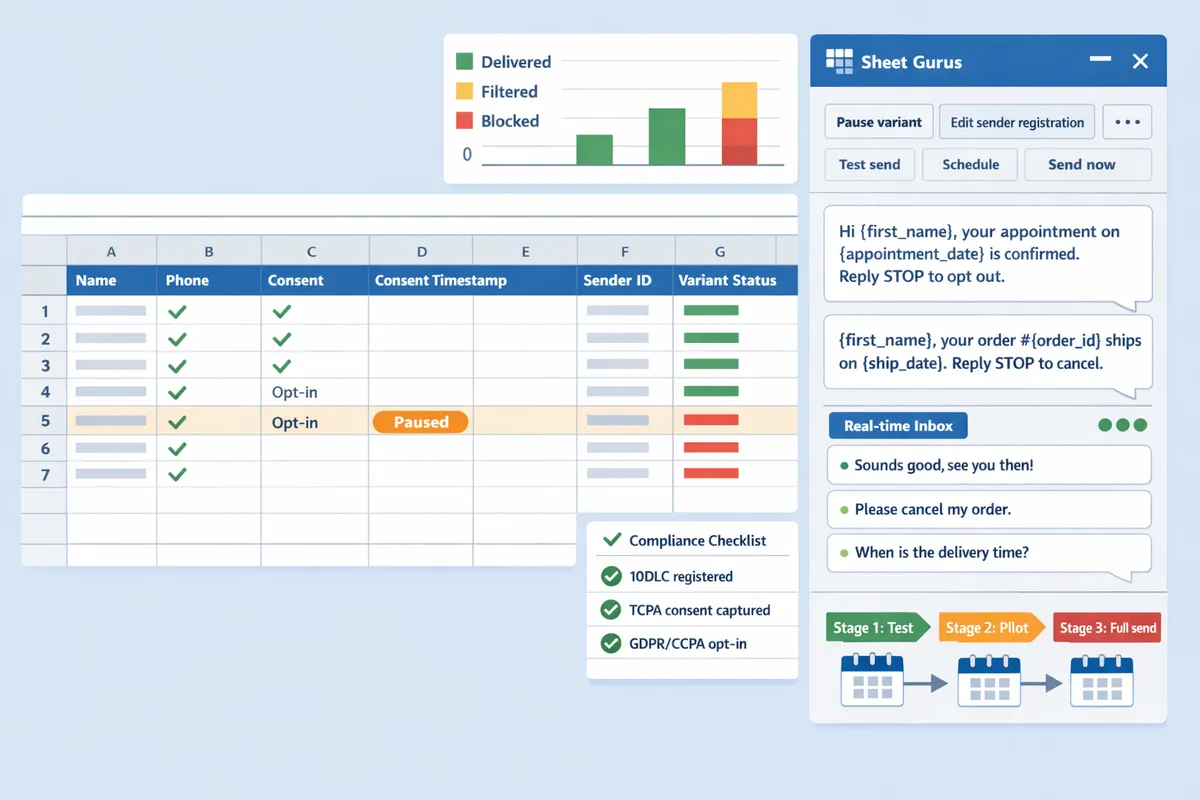
Use Sheet Gurus SMS’s real time inbox to capture replies and update your Google Sheet automatically during testing. If a variant shows carrier rejections above 2% or complaint rates rising, pause that variant, inspect sample messages, and iterate on sender registration or wording. For examples of automated workflows and scheduling that support staged tests, see our Automated Text Messaging and Automated Text Messaging Services pages.
How do you implement filtering-aware campaigns from Google Sheets and measure success?
Implement filtering-aware campaigns by registering sender identities, capturing auditable consent fields in each row, using curated curly-brace templates, and monitoring delivery and complaint signals in real time. These four controls reduce carrier filtering risk and speed troubleshooting when a segment or region shows elevated rejections.
Set up Sheet Gurus SMS and register sender IDs
Install the Sheet Gurus SMS add-on, register your 10DLC/toll-free/short code details, and add consent and opt-out columns to every contact row. Sheet Gurus SMS sends from the sidebar so the add-on can run automatic filtering checks before dispatch. Follow the step‑by‑step setup in our Automated Text Messaging Services article for registering sender IDs and required fields. Example columns to add in your sheet: Phone (E.164), OptInTimestamp, OptInSource, ConsentMethod, OptOutFlag, Language, PreferredSenderType. Use a strict phone format (for example, +12223334444) so carrier reachability tests run cleanly.
Design templates and use curly-brace variables for personalization 📣
Use short, consistent templates with limited curly-brace variables so messages stay predictable for filters. Curly-brace variables let you personalize without introducing free-text noise; Sheet Gurus SMS supports variables like {FirstName}, {AppointmentDate}, and {OrderNumber}. Example templates: \“Hi {FirstName}, your appointment at {ClinicName} is at {Time}. Reply STOP to opt out.\” and \“Hi {first_name}, your balance of ${balance} is due on {due_date}. Reply STOP to opt out.\” Keep personalization to trusted identifiers (name, appointment time, order number). Avoid injecting user‑supplied free text, long notes, or uncontrolled emojis because those increase false positives with carrier filters. See our Effortless SMS Blasts guide for workflow examples that pair templates with scheduling and personalization.
Compare carriers and platforms to pick sender settings
Use a simple carrier comparison table to decide sender type, content adjustments, and scaling constraints before you scale. The table below shows typical filtering tendencies and recommended sender choices by region. Use this as a planning map and run small local tests per carrier to confirm behavior.
| Carrier / Region | Common Triggers | Preferred Sender Type | Typical Throughput Constraints | Recommended Content Adjustments |
|---|---|---|---|---|
| US (AT&T, Verizon, T-Mobile) | Unknown sender ID, promotional language, long or variable user text | Registered 10DLC for business messages; short code for high-volume promos | High scrutiny for unregistered routes; registered 10DLC preferred for consistent throughput | Use clear opt-in language, include STOP, limit links and promo words |
| EU (major national carriers) | Consent and lawful basis gaps, foreign sender formats, URL patterns | Local long numbers or verified toll-free where available | Carriers favor moderate throughput with strict consent checks | Confirm lawful basis and local opt-out text; avoid cross-border sender mismatches |
| LATAM (regional carriers) | Short domains, unknown registrars, language mismatches | Local numbers or verified toll-free; test local sender identity | Varies widely by country; expect stricter content review on first sends | Localize language, minimize URL use, test small batches first |
| APAC (diverse carriers) | Local compliance rules, keyword filtering, operator-specific blocks | Local numbers or operator-approved senders | Highly variable; some operators apply tight keyword filters | Localize templates, confirm opt-in source, run carrier-specific small tests |
Monitor KPIs and set thresholds for action
Track delivery rate, carrier rejection codes, STOP/complaint rate, and reply rate with defined escalation thresholds to detect filtering issues quickly. Start with clear, measurable thresholds: a sustained delivery rate drop of 5 percentage points, a 3x spike in carrier rejection codes within 24 hours, or a STOP rate above 0.5% on promotional sends should trigger investigation. Use Sheet Gurus SMS real-time inbox to triage replies and map rejection codes back into your Google Sheet so rows show current status. Record the rejection code, timestamp, and suggested action in new columns. Run daily automated sanity checks and a weekly digest that includes a sample of blocked messages. For capacity planning, model expected throughput with the 10DLC cost and throughput calculator 2026 before moving from test to scale. Link to our Automatic Compliance Filtering checklist if you need the TCPA-focused pre‑send validations used by Sheet Gurus SMS.
💡 Tip: Keep a simple audit log in the Sheet row (opt-in timestamp, source, template version). This speeds dispute resolution and carrier inquiries.
Adjust per region and run monthly reviews
Conduct monthly reviews by region and adjust sender type, send timing, and template wording based on test results and carrier feedback. For EU recipients, confirm lawful basis and retention windows before changing sender types. For LATAM and APAC, run small localized sends to surface carrier-specific filters and then expand. Keep a changelog column in your Sheet for every adjustment (what changed, why, who approved, date) so audits and regulatory requests are fast. Use the Sheet Gurus SMS two-way inbox to update consent fields when recipients reply, and link monthly findings back to your consent ledger; see our SMS Compliance for Google Sheets Senders in 2026 guide and the sms consent record keeping google sheets tag for templates and ledger examples.
Frequently Asked Questions
This FAQ answers the practical compliance and deliverability questions marketers ask when sending SMS from Google Sheets with Sheet Gurus SMS. Use these answers to spot risks quickly, wire up auditable consent fields in your sheet, and run small tests that prove whether a campaign will pass carrier filters.
How does automatic message filtering in Sheet Gurus SMS work? 🛡️
Automatic message filtering in Sheet Gurus SMS performs a pre-send compliance check that inspects template variables, consent flags, and sender registration and prevents high-risk messages from dispatching. Our add-on evaluates curly-brace variables (for example, \“Hi {first_name}, your appointment is {appointment_date}.\”), checks that each contact row has a date-stamped consent entry, and verifies the sender identity is registered for the campaign type. When a message matches known filter patterns the sidebar surfaces the exact issue and suggested edits, so you can fix the template or update registration before sending. This reduces manual review time and keeps an auditable trail inside the sheet. For implementation details and checklist items, see our guide to automatic compliance filtering.
Do I still need 10DLC registration if I use Sheet Gurus SMS? ✅
You still need 10DLC registration for U.S. commercial campaigns to avoid carrier throughput limits and blocking. Sheet Gurus SMS helps you capture the required registration fields in the sheet and maps campaign types to the registration form so you can submit accurate information to carriers. Budget for registration fees and throughput tiers by using a 10DLC cost and throughput calculator before you register. For an expanded TCPA and 10DLC checklist tailored to Google Sheets senders, see our SMS compliance guide for 2026.
What message elements most commonly trigger carrier filters? 🚨
Common triggers include excessive links, URL shorteners, misleading or all-caps language, unknown sender names, and spikes in complaints or STOP rates. Specific examples: messages with two or more shortened URLs; subject lines in all caps like \“LIMITED OFFER\”; free-form user inputs such as \“{user_message}\” that can contain prohibited terms. Personalization with safe variables (for example, \“Hi {first_name}, your order {order_number} ships today.\”) reduces risk compared with inserting raw user-provided text. Put clear branding in the first line and avoid multiple outbound links to lower filter risk.
How should I store consent and opt-out data in Google Sheets? 📁
Store consent as discrete, date-stamped fields on each contact row with source and method and update opt-out status automatically when recipients text STOP. Useful column set: contact_phone, consent_date, consent_source (web form, paper, in-person), consent_text (exact opt-in wording), opt_out (TRUE/FALSE), opt_out_date, and country. Our Sheet Gurus SMS real-time inbox routes replies to the sheet and syncs STOP/HELP replies back to the contact row so opt-outs become actionable immediately. Retain consent records according to the legal retention policy in your target region and export them for audits when necessary.
💡 Tip: Use double opt-in for higher proof value and record the confirmation timestamp in the consent_text field.
How quickly can I detect if a campaign is being filtered? ⏱️
You can detect filtering within the first few hundred sends by monitoring carrier rejection codes, sudden drops in delivery rate, and increases in complaint percentages. Run a 500-recipient seed test split across carriers and regions, then compare a control segment to the campaign segment: stop and investigate if delivery rate drops by more than 10 percentage points, if complaint rate exceeds 0.3 percent, or if carrier rejection codes appear in the Sheet Gurus SMS send log. Use a 4-week testing plan that isolates content, sender ID, and cadence one variable at a time to identify the filter trigger.
Are there regional differences I must plan for in 2026? 🌍
Yes. U.S. carriers enforce 10DLC and TCPA requirements; the EU requires a lawful basis under GDPR plus transparency; LATAM and APAC carriers often block unknown senders and may require local registration or specific sender ID formats. For example, in the U.S. failure to register a commercial campaign can cause throughput throttling or blocking. In the EU you must document the legal basis and keep consent evidence for each contact. Our recommendation: test small, region-specific segments, record which templates and sender IDs passed filters in your sheet, and replicate those exact settings for future sends. For region-specific workflows, see our automated SMS messaging workflows and mass-texting use cases.
Pre-send compliance checks prevent carrier blocks and preserve delivery.
Applying auditable opt-in records, registered 10DLC, and pre-send content checks reduces the chance of carrier blocking and costly downtime. Our SMS Compliance for Google Sheets Senders in 2026 guide walks through the specific steps Google Sheets senders must take to keep campaigns moving and auditable. Understanding message filtering sms marketing helps you prioritize the opt-in, content, and reachability checks that matter most.
Sheet Gurus SMS is a Google Sheets add-on for sending bulk SMS from a sidebar rather than spreadsheet formulas. Personalize each message with curly-brace variables such as {FirstName}, handle replies in a real-time two-way inbox, and rely on automatic message filtering to help keep your sends compliant.
💡 Tip: Run a compliance-tested send to a small opt-in segment before any large blast.
Install Sheet Gurus SMS and send your first compliance-tested test blast from the sidebar using our Google Sheets SMS blasting guide or the automatic compliance filtering checklist. Subscribe to our newsletter for implementation tips and updates.