


How to Integrate Google Sheets with SMS: Add-on vs Apps Script vs Zapier/Make (Buyer’s Guide + TCO Calculator)
A missed SMS reminder costs a small clinic roughly $150 per no-show and teams sending hundreds of texts each week lose hours to manual work. This Buyer’s Guide compares how to integrate Google Sheets with SMS via Sheet Gurus SMS, Apps Script, or no-code tools like Zapier and Make; see our guide to
send text messages from Google Sheets for setup details. Sheet Gurus SMS is a Google Sheets add-on that sends bulk SMS from a sidebar, supports curly-bracket variables, offers a real-time inbox, and applies automatic filtering. Example: Hi {first_name}, your appointment at {location} is confirmed for {date}. Which route reduces monthly operational headaches for your team?Which methods can you use to integrate Google Sheets with SMS?
You can integrate Google Sheets with SMS using a Sheets add-on, custom Apps Script, or a no-code automation platform. Each method trades off setup time, operational control, and ongoing maintenance, so choice depends on scale, compliance needs, and who will operate the workflow.
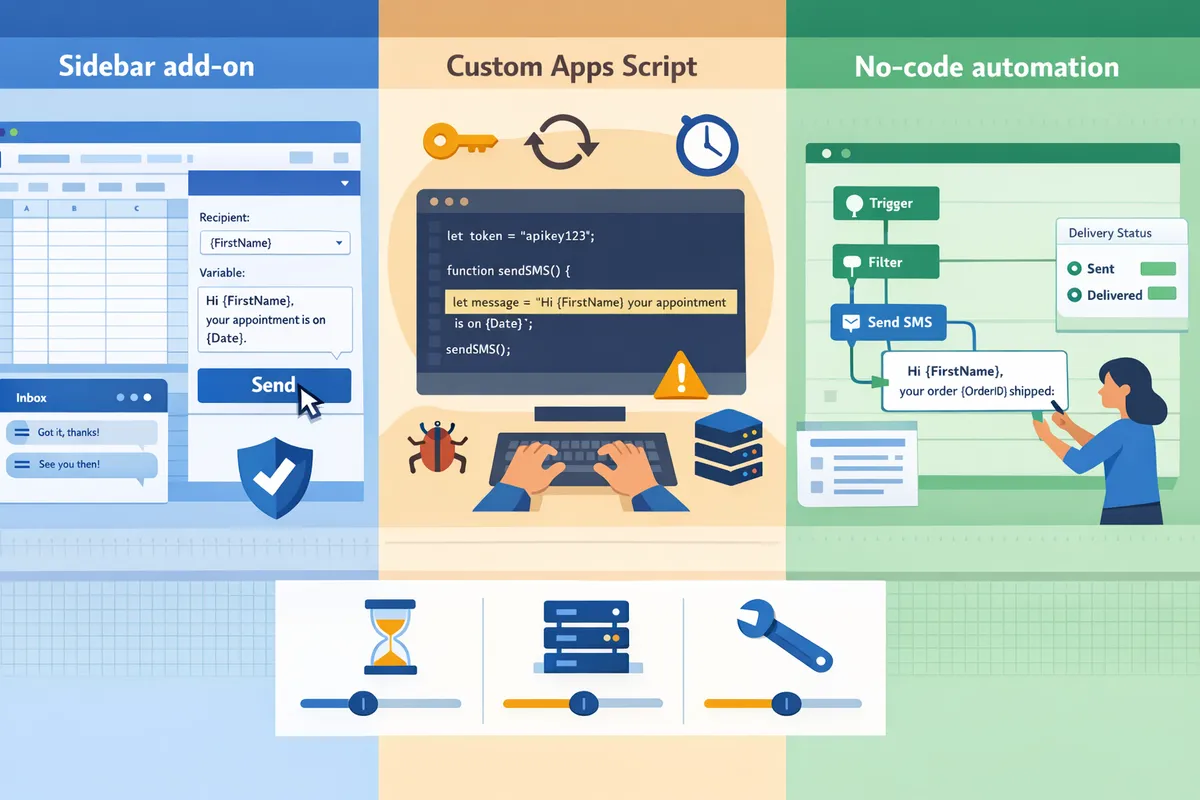
What is Sheet Gurus SMS and how does it work? 📬
Sheet Gurus SMS is a Google Sheets add-on that sends messages from a sidebar and supports dynamic variables, two-way inbox, and automatic compliance filtering. The add-on runs inside the Sheets UI so you send bulk or single messages without spreadsheet formulas; you type a template with curly-brace variables like {FirstName} and {ApptDate}, select rows, and send from the sidebar. Sheet Gurus SMS shows a real-time inbox for replies and filters messages to help meet regional opt-in rules. For step-by-step installation and a ready-made template, see our Guide: Sending SMS from Google Sheets with Sheet Gurus SMS [Updated 2025].
💡
Tip: Always use double opt-in for SMS signups.
How do Google Sheets add-ons send SMS from Google Sheets? ⚙️
Google Sheets add-on is a type of extension that runs in the Sheets sidebar and calls an SMS provider API on the user’s behalf. Add-ons centralize templating, credential storage, retry logic, and rate-limit handling inside the sidebar UI so non-developers can send scheduled reminders and one-click bulk sends from a selected range. Typical add-on features include dynamic placeholders, send previews, per-row delivery status, and a retry queue for transient failures. Sheet Gurus SMS handles template variables such as “Hi {FirstName}, your appointment is on {ApptDate} at {ApptTime}. Reply YES to confirm.” Use the add-on when you want low setup time, built-in compliance filtering, and a visible reply inbox without building backend services. Read our blog post on harnessing Sheets for SMS for usage patterns and examples.
How does Apps Script send SMS from Google Sheets? 👨💻
Apps Script is a server-side scripting environment that runs custom JavaScript to call external APIs, including SMS providers. Apps Script gives full control over payloads, rate limiting, retry policies, and custom logging, but you must build credential storage, token refresh, exponential backoff, quota monitoring, and concurrency controls yourself. Expect developer hours to implement secure key storage, handle API rate limits, and avoid race conditions when multiple sends run at once. Example snippet showing minimal send plus basic retry logic (illustrative only):
function sendSms(row) {const payload = {to: row[2], body: `Hi ${row[0]}, appt ${row[1]}`};try { UrlFetchApp.fetch('https://sms.api/provider', {method:'post', payload: payload}); }catch(e){ Utilities.sleep(2000); /* retry/backoff logic required */ }}
Building monitoring dashboards, alerting for delivery failures, and secure credential rotation add ongoing maintenance. If your team lacks a developer to handle token refresh, concurrent send limits, and retry logic, consider a managed add-on like Sheet Gurus SMS that removes those operational burdens.
⚠️ Warning: Avoid storing sensitive personal health information directly in shared Sheets without encryption and strict access controls.
How do no-code automation platforms (Zapier, Make, Pabbly) connect Sheets to SMS? 🔗
No-code automation platform is a hosted service that maps Google Sheets triggers to actions on SMS providers using prebuilt connectors and field mapping. These platforms reduce initial development time and let you visually map columns to message templates, apply filters, and chain actions like logging sends to another sheet. Downsides include recurring platform fees, potential per-action charges, and variable latency; some plans poll Sheets at 1 to 5 minute intervals which impacts near-real-time messaging. Two-way replies and message threading are often limited or require additional setup with webhooks. For low-volume, simple workflows Zapier or Make work well. For higher volume, strict compliance, or integrated reply management, Sheet Gurus SMS provides in-sheet templating, a reply inbox, and built-in compliance filtering to reduce long-term operational complexity.
Related resources: see our blog on automating SMS from Google Sheets without coding and review pricing and plan options on our Send bulk SMS directly from Google Sheets pricing page.
How do the options compare side-by-side for sending SMS from Google Sheets?
The fastest way to judge each option is to compare setup time, ongoing effort, deliverability controls, two-way support, and security. This side-by-side view helps you match staffing and scale to the right approach rather than picking on features alone.
Side-by-side feature comparison ✅
Sheet Gurus SMS, Apps Script (DIY), and no-code automation platforms differ across setup, running costs, and operational burden. The table below highlights the core trade-offs so you can scan which option fits a small team, a growth org, or an enterprise pilot.
| Criterion | Sheet Gurus SMS (Add-on) | Apps Script (DIY) | No-code platforms (Zapier, Make, etc.) |
|---|---|---|---|
| Setup time | Minutes to an hour (install+authorize). | Days to weeks (auth, API client, token flow). | 1–4 hours (connectors + mapping). |
| Per-message cost | Carrier + platform markup visible in billing. | Carrier cost only (you manage accounts). | Carrier cost + automation platform per-task charges. |
| Subscription cost | Monthly add-on fee applies. See Sheet Gurus SMS pricing for plans. | No subscription for script; hosting costs possible. | Monthly plans vary by automation volume and tasks. |
| Developer hours (initial) | 0–4 hours (config, templates). | 20–80 hours (auth, retries, logging). | 4–16 hours (map fields, test flows). |
| Credential management | Centralized by Sheet Gurus SMS, no spreadsheet formulas. | You must store/rotate keys securely and implement token refresh. | Platform stores credentials; review platform access policies. |
| Retry logic | Built-in retry and backoff handled by the add-on. | You must implement retries, exponential backoff, duplicate suppression. | Basic retry or webhook replay depending on provider. |
| Throttling / rate limits | Add-on queues and enforces throttles automatically. | You must monitor, throttle, and handle quota errors (429s). | Varies; many platforms surface throttling errors but require manual flow changes. |
| Two-way messaging | Real time inbox and reply threading in sidebar. | Requires webhook endpoint and a message store; significant work. | Some providers offer two-way via webhooks; platform may not surface an inbox. |
| Template personalization | Curly-brace variables in UI (e.g., “Hi {first_name}, appointment {date}”). | You build templating and escaping; risk of injection if not handled. | Supports variables; mapping UI varies and may require workarounds. |
| Compliance features | Automatic message filtering and opt-out handling built in. | You must build opt-out lists, filters, and audit trails. | Some platforms offer compliance modules; often manual setup. |
| Analytics | Message-level delivery statuses and inbox in sidebar. | You must log receipts and build dashboards (BigQuery / Sheets). | Delivery webhooks available; dashboards vary by platform. |

How to interpret the TCO calculator inputs 🧾
TCO compares recurring platform fees, carrier costs per message, and developer/maintenance labor over 1 and 3 years. Include these inputs: message volume, per-message carrier cost, platform subscription, developer hourly rate, and maintenance hours per month. Use those inputs to compute yearly totals as: (message volume (carrier cost + platform per-message fee)) + (subscription) + (developer hours hourly rate) + (maintenance hours hourly rate 12). Provide separate lines for one-time development and ongoing operations.
Example scenarios (illustrative inputs only):
- Small practice: 5,000 msgs/year. Expect low subscription impact; developer time near zero if using Sheet Gurus SMS. Compare per-message cost dominated by carrier fees. See the step-by-step setup in the Guide: Sending SMS from Google Sheets with Sheet Gurus SMS [Updated 2025].
- Growing business: 50,000 msgs/year. Subscription tiers and per-message platform fees start to matter. DIY Apps Script shows developer costs rising because you must build throttling, retries, and logging. No-code platform fees also rise with task counts. Link to the pricing overview for estimating monthly plan tiers.
- Enterprise pilot: 250,000 msgs/year. Operational costs dominate: monitoring, credential rotation, and quota handling. Sheet Gurus SMS reduces maintenance hours by centralizing retry logic and inbox handling, while DIY requires dedicated engineering time for scaling and outage recovery.
Provide the TCO calculator with editable fields for these inputs so readers can test their own assumptions rather than use headline numbers.
Analytics and deliverability visibility 📊
Visibility into delivery receipts and replies differs dramatically by method. Sheet Gurus SMS surfaces message-level delivery statuses and a real time inbox in the sidebar, making it straightforward to track bounces and reply threads without building extra infrastructure. No-code platforms typically expose delivery webhooks and basic logs; you often send webhook data to Sheets or BigQuery for dashboards. Apps Script requires you to implement receipt handling, store statuses, and build dashboards; expect to add retry and deduplication logic for accurate metrics.
Practical example: to show a delivery dashboard from Apps Script you must wire a webhook, persist receipts to a log sheet, and implement a daily aggregation script for bounce rates. That is at least several extra engineering days plus monitoring.
Security and access control comparison 🔒
Security needs include credential storage, least-privilege access to shared Sheets, and audit logs. Sheet Gurus SMS centralizes credential handling and enforces message filtering and opt-out rules inside the add-on, reducing the number of people who need direct carrier credentials. No-code platforms store credentials on their service; evaluate their access controls and audit trail before trusting production data. Apps Script stores secrets in script properties or external secrets stores; you must implement rotation, RBAC, and audit logs yourself.
Specific operational burdens for DIY that add time and risk: credential rotation, token refresh flows, quota monitoring, retry/backoff logic, race conditions on concurrent writes, and cache invalidation. Sheet Gurus SMS removes those burdens by handling retries, inbox threading, and filtering for compliance in the sidebar UI. If you choose a DIY route, budget ongoing hours for security reviews and automated credential rotation.
💡 Tip: Always use double opt-in for SMS signups and store consent timestamps in your sheet to support audits.
For step-by-step setup of the Sheet Gurus SMS sidebar and templates, see our detailed guide on sending SMS from Google Sheets with Sheet Gurus SMS. For plan and per-message estimates consult the Sheet Gurus SMS pricing page.
Quick DIY snippet illustrating added complexity
The code below shows how an Apps Script flow must handle auth and retry logic even for a single send (illustrative only).
function sendSms(row) {const token = getAccessToken; // implement refreshfor (let i=0;i<3;i++){try{UrlFetchApp.fetch('https://api.sms.example/send',{method:'post',headers:{Authorization:'Bearer '+token},payload:row});return;}catch(e){Utilities.sleep(1000*(i+1));}}logFailure(row);}
That snippet omits secure token storage, exponential backoff nuances, and receipt handling you would need for production.
For more implementation patterns and use cases, check our blog on harnessing Google Sheets for SMS or the automation walkthrough on how to automate SMS from Google Sheets without coding.
Which option should you choose and how to decide using the buyer’s checklist and TCO?
Choose the option that matches your message volume, developer capacity, compliance needs, and tolerance for ongoing maintenance. Use the buyer’s checklist and the included TCO calculator to compare 1- and 3-year costs, then validate the decision with two practical workflows.
When to choose Sheet Gurus SMS (recommended for two-way and compliance) 📬
Choose Sheet Gurus SMS when your team needs two-way messaging, automated compliance filters, and a real-time inbox without building backend services. Sheet Gurus SMS sends messages from a Google Sheets sidebar, supports curly-brace dynamic variables, and exposes a real-time inbox so replies stay tied to the originating row. This removes the need to manage credential rotation, token refresh, retry loops, or webhook hosting. Typical fits include appointment reminders, payment notices, political outreach with strict opt-in rules, and support teams that require message-thread continuity. Read the detailed how-to in our Guide: Sending SMS from Google Sheets with Sheet Gurus SMS [Updated 2025].
When to choose Apps Script (DIY) and the operational complexities you must manage 🛠️
Choose Apps Script only if you require full custom control and have developers available for long-term maintenance. Building a robust Apps Script solution requires solving credential management, token refresh, quota handling, exponential backoff for retries, race conditions on concurrent writes, cache invalidation, monitoring and alerting, and adapting to API changes. Example: implementing a delivery-receipt pipeline demands webhook hosting, retry queues, and idempotency keys; expect initial build time of tens of developer-hours and continuous monthly maintenance. You can implement any feature with Apps Script, but you must own logs, retry policies, security controls, and scaling when volume grows.
When to choose Zapier/Make/no-code platforms and the trade-offs at scale ⚖️
Choose Zapier or Make when you need rapid connectors, minimal engineering time, and you can accept per-action costs and potential latency. No-code platforms accelerate proofs of concept and multi-app workflows, but they add recurring connector fees, delayed retries, and limited two-way messaging support compared with an add-on built for Sheets. At scale, branching logic increases task counts and monthly fees; providers may throttle actions or impose task quotas that complicate burst sends. Use no-code for low-volume automations or mixed-app pipelines, and consider switching to Sheet Gurus SMS when reply handling, compliance filtering, or throughput requirements grow.
How to use the included TCO calculator to pick the lowest-cost path 🧾
Use the TCO calculator by entering expected monthly message volume, per-message carrier cost, platform subscription fees, estimated developer build hours, and monthly maintenance hours to compute 1- and 3-year totals. Steps:
- Enter monthly messages and per-message carrier fee.
- Add platform subscription or connector fees for Zapier/Make and Sheet Gurus SMS pricing.
- Add developer build hours and an hourly rate for Apps Script scenarios.
- Add recurring maintenance hours per month and their hourly rate.
- Review 1- and 3-year totals and the break-even month column.
- Run sensitivity scenarios: increase volume by 2x and re-check break-even points.
The calculator highlights where buying a Sheets add-on becomes cheaper than ongoing developer time and where no-code connector fees exceed platform subscriptions. Use the outputs to justify budget proposals or to decide when to migrate from no-code to a dedicated add-on. For a step-by-step setup and sample inputs, see our automation walkthrough in How to Automate SMS from Google Sheets Without Coding.
💡 Tip: Always use double opt-in for SMS signups and record timestamped consent in your sheet.
Buyer\’s checklist: minimum features to require before purchasing ✅
Require the following features before buying: sidebar-based bulk sending, curly-brace dynamic variables, a real-time inbox or webhook replies, automated compliance filtering, delivery receipts, and role-based access control. The table below shows which option typically meets each requirement out of the box and where custom work is needed.
| Feature | Sheet Gurus SMS | Apps Script (DIY) | Zapier / Make |
|---|---|---|---|
| Sidebar-based bulk sending | Yes. Built-in sidebar UI for “how to send bulk sms from google sheets sidebar” workflows. | Partial. Requires custom UI or menu and coding. | No. Zapier/Make triggers from new/changed rows instead of a sidebar. |
| Curly-brace dynamic variables | Yes. Template support in sidebar inputs. | Yes. You must parse templates and escape inputs. | Partial. Must build templating in steps; more fragile. |
| Real-time inbox / reply threading | Yes. Real-time inbox ties replies to rows. | Partial. Requires webhook server and mapping logic. | No or Partial. Many platforms lack robust inbox threading. |
| Automated compliance filtering (opt-outs, opt-ins) | Yes. Built-in filters and blocking rules. | Partial. You must implement validation and rule updates. | Partial. Possible with logic paths but error-prone at scale. |
| Delivery receipts and status tracking | Yes. Built-in status and receipts in UI. | Partial. You must process delivery callbacks and reconcile. | Partial. Depends on provider connectors and webhook support. |
| Role-based access control for send/approve | Yes. Built-in user/role controls. | Partial. Requires integrating with Google Workspace IAM or custom checks. | No. Access control limited to platform account sharing. |
Practical example workflows and templates for each option 📝
Use these two example workflows to validate deliverability, reply handling, and TCO assumptions across each approach.
Workflow A — Appointment reminders from the sidebar (use Sheet Gurus SMS). Template: “Hi {FirstName}, your appointment is on {Date}. Reply Y to confirm.” Steps:
- Add contact rows with columns: Phone, FirstName, Date, Status.
- Open the Sheet Gurus SMS sidebar and select template “Hi {FirstName}, your appointment is on {Date}. Reply Y to confirm.”
- Preview personalized messages for a sample of 10 rows to validate variable substitution and number formatting.
- Send a batch; Sheet Gurus SMS records delivery receipts and shows replies in the real-time inbox tied to the original row.
- Use the built-in compliance filters to remove opt-outs before sending and export delivery metrics to a report sheet.
Where Sheet Gurus SMS removes custom work: no webhook hosting for replies, no delivery-receipt pipeline, built-in opt-out checks, and inbox continuity for support teams.
Workflow B — Billing reminders triggered by a status column (Zapier example). Template: “Hi {FirstName}, your invoice {InvoiceID} is due {DueDate}. Reply PAY to request a payment link.” Steps:
- In Google Sheets, update Status to “Due” when invoice crosses threshold.
- Zapier triggers on row change, formats the message with variables, and calls an SMS connector.
- Zapier logs the action and updates a SentTimestamp cell.
- For replies, Zapier can forward inbound webhooks to an email or Slack channel but cannot reliably thread replies to the originating sheet row without extra mapping.
- Monitor Zap task usage and connector costs; if volume grows, export logs and plan migration.
Phone number validation, deduplication, and bounce handling: always include a pre-send validation step (script or add-on check) and mark invalid rows so the TCO calculator can count avoided carrier fees. For analytics, export delivery receipts and bounce rates into a metrics sheet or connect to our dashboard for centralized reporting.
For more implementation patterns and example templates, see our detailed Guide: Sending SMS from Google Sheets with Sheet Gurus SMS [Updated 2025] and visit the Sheet Gurus blog for use-case ideas and pricing details on sending bulk SMS directly from Google Sheets.
Frequently Asked Questions
This FAQ answers the operational, compliance, and cost questions readers raise when they integrate Google Sheets with SMS across add-ons, Apps Script, and no-code tools. It focuses on practical trade-offs you will face: data quality, two-way flows, scheduling, and total cost of ownership. Use the links to our guides for step-by-step setup and the TCO calculator to run your numbers.
Can I send bulk SMS directly from Google Sheets without code?
Yes. You can send bulk SMS from Google Sheets without writing code by using a Sheets add-on or a no-code automation platform. Sheet Gurus SMS sends messages from a sidebar, supports curly-brace variables (for example: “Hello {first_name}, your appointment is on {date}”), and handles batching and basic retrying. No-code platforms such as Zapier or Make let you push rows to an SMS provider but often add latency and per-action costs. Add-ons keep the workflow inside the sheet, which simplifies personalization and repeated sends; see our step-by-step guide to sending SMS from Google Sheets with Sheet Gurus SMS for a full walk-through on how to send bulk sms from google sheets sidebar.
How does two-way messaging work when I integrate Google Sheets with SMS?
Two-way messaging requires an inbox or a webhook to capture and store replies. Sheet Gurus SMS provides a real-time inbox in the sidebar so replies appear next to the sheet and you can thread conversations without building infrastructure. A DIY Apps Script approach needs a public webhook endpoint, persistent storage (Cloud SQL, Firestore, or a dedicated sheet table), and code to correlate replies to rows; you must manage credential rotation, token refresh, and retry handling. No-code platforms offer reply handling but often limit retention windows and make threading harder to scale.
What compliance checks should I add when sending SMS from Google Sheets?
You must enforce opt-in records, regional consent rules, opt-out handling, and content filtering before any bulk send. Track opt-in source and timestamp in the sheet; apply per-region rules (for example, TCPA requirements in the U.S. or consent records for EU recipients); implement a suppression list column and honor STOP replies immediately. Sheet Gurus SMS includes automatic message filtering to reduce the chance of sending restricted content and can surface suppressed recipients in the sidebar.
💡 Tip: Always use double opt-in for SMS signups.
How do I validate phone numbers in a sheet before sending?
Normalize numbers to E.164, deduplicate, and verify with a phone-validation API or an add-on check before sending. Practical steps: 1) use a formula or Apps Script to strip non-digits and add country codes, 2) run a batch validation call to flag invalid or high-risk numbers, 3) remove duplicates and move invalid entries to a review tab. Sheet Gurus SMS performs built-in validation checks during the compose flow, which prevents obvious formatting errors and reduces failed sends.
Can I schedule messages from the Google Sheets sidebar?
Yes. Many add-ons and some no-code platforms support scheduling directly from a sheet sidebar. With Sheet Gurus SMS you can schedule sends from the sidebar and the platform manages queuing and retries to improve deliverability and handle rate limits. Building this with Apps Script requires time-based triggers, idempotent job queues, retry/backoff logic, and monitoring to avoid duplicate sends or missed runs.
How do message costs compare between building and buying?
Message costs combine carrier per-message fees plus either platform subscription fees or developer and maintenance expenses for a DIY solution. For example, a one-time 50-hour developer build at $80/hour equals $4,000 initial cost plus ongoing monitoring; a paid add-on spreads that cost as a subscription and includes queuing, retries, and inbox handling. Use our TCO calculator to compare 1- and 3-year totals and factor in ongoing items: subscription or per-message fees, developer hours for updates, and support/monitoring costs. See our pricing and plan details on the Sheet Gurus SMS pricing page to input realistic subscription numbers.
What happens if a message bounces or fails when sent from a sheet?
Failed messages require delivery-status tracking, retry logic, and alerting to avoid silent drops. Sheet Gurus SMS surfaces delivery statuses in the sidebar and can retry failed sends automatically; an Apps Script solution must implement provider webhook handling, a retry queue with exponential backoff, logging, and an escalation path after N failed attempts. Example retry pseudocode to illustrate complexity:
try {sendMessage(row);} catch (err) {scheduleRetry(rowId, backoffMs);logFailure(rowId, err.message);}
Use the delivery receipts to update sheet rows and trigger manual review on repeated failures.
Related reading: our blog on automating SMS from Google Sheets without coding and the broader Sheet Gurus blog include implementation notes and campaign examples.
Pick the method that matches your technical bandwidth and long-term costs.
For small teams or nondevelopers, using Sheet Gurus SMS or a no-code tool avoids the ongoing engineering work required to maintain Apps Script, retry logic, token refresh, and quota handling. If you need to integrate google sheets with sms at scale and reduce maintenance, the add-on approach typically lowers total cost of ownership compared with a custom script. See the sending SMS guide for step-by-step setup and cost assumptions in our detailed TCO calculator.
Sheet Gurus SMS is a platform that helps users save time and money by enabling them to send bulk SMS to their recipients easily from within Google Sheets. The product is a Google Sheets add-on and messages are sent via a sidebar not via spreadsheet formulas. The product has the following features:
- Text messages can be sent with curly brackets as variables to allow for dynamic content.
- A real time inbox to allow for two way communication with recipients.
- Automatic message filtering to keep users compliant with regulations.
Example message: “Hello {first_name}, your appointment on {date} is confirmed.”
💡 Tip: Test dynamic variables with a small sample before a full bulk send to verify formatting and deliverability.
Schedule a consultation with Sheet Gurus SMS to map your workflows and get a pilot configured. For more implementation ideas, browse our sending SMS from Google Sheets guide and the Sheet Gurus blog.