



Google Sheets Schedule Template Free: 2026 K‑12 SMS
Google Sheets Schedule Template Free is a downloadable K‑12 calendar template that pairs with
Sheet Gurus SMS, a Google Sheets add-on that sends scheduled texts from a sidebar rather than spreadsheet formulas. Our platform helps schools save hours and reduce missed events by sending bulk SMS with dynamic variables like {FirstName}, managing replies in a real-time inbox, and applying automatic message filtering for compliance. Use our K‑12 SMS templates and playbook and scheduled message examples to start sending {EventDate} reminders this week. Want a quick sample {FirstName} text to copy into the sidebar?Which free 2026 Google Sheets calendar template fits my K‑12 school?
Pick the template that matches your schedule type, printing needs, and how you will send SMS from the sheet. Choosing the right template cuts setup time and reduces mistakes when you map columns to Sheet Gurus SMS. Below are targeted recommendations, a side-by-side comparison, common scenario matchups, and a checklist for safe sharing before you send messages.
Quick 3-template starter path 🏫
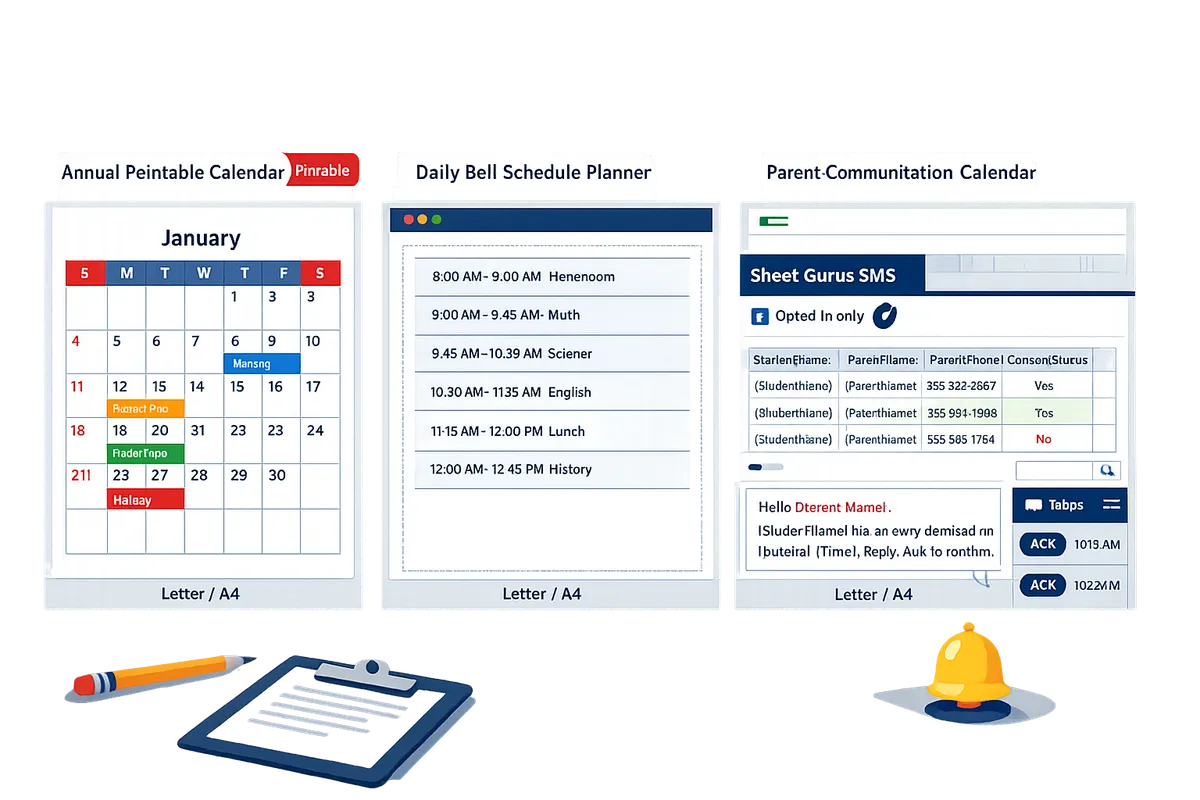
Use our three starter templates — Annual Printable Calendar, Daily Bell-Schedule Planner, and Parent-Communication Calendar — to cover most K‑12 scheduling needs.
Annual Printable Calendar. Best for district-wide dates and handouts. Required fields: Date, EventTitle, Description. Print-ready as Letter or A4 with month-per-page layout. Map an EventContact column to Sheet Gurus SMS to send reminders like: “Reminder: {EventTitle} on {Date}. Reply YES to confirm.”
Daily Bell-Schedule Planner. Best for classroom and school-wide bell times, period rotations, and substitute coverage. Required fields: Date, Period, StartTime, EndTime, AssignedStaff. Use the template to export daily schedules to teachers and map AssignedStaffPhone to Sheet Gurus SMS for quick period alerts. Example message: “Hi {StaffName}, today period {Period} runs {StartTime}-{EndTime}.”
Parent-Communication Calendar. Best for targeted parent messaging: permission slips, events, and dismissal changes. Required fields: StudentName, ParentName, ParentPhone, ConsentStatus. Keep ConsentStatus visible so you only send to opted-in contacts. Example: “Hello {ParentName}, {StudentName} has an early dismissal on {Date} at {Time}. Reply ACK to confirm.”
Template comparison table 🗂️
This table compares the three starter templates by ideal audience, required columns, printable page sizes, and Sheet Gurus SMS readiness.
| Template | Ideal audience | Required columns | Printable page sizes | Sheet Gurus SMS readiness (how to map contact columns) |
|---|---|---|---|---|
| Annual Printable Calendar | District admins, front office | Date, EventTitle, Description, Location | Letter, A4, optional landscape month grid | Map EventContact or DistrictPhone to Sheet Gurus SMS. Use +1 country code. Keep EventContact type “Phone” or “EmergencyPhone.” |
| Daily Bell-Schedule Planner | Principals, teachers, scheduling clerks | Date, Period, StartTime, EndTime, AssignedStaff, AssignedStaffPhone | Letter (weekly block), A4 | Map AssignedStaffPhone to Sheet Gurus SMS. Use header “StaffPhone” and include staff role column for segmentation. |
| Parent-Communication Calendar | Teachers, parent liaisons, activities coordinators | StudentName, ParentName, ParentPhone, ConsentStatus, MessageSegment | Letter (event flyer), A4 (table) | Map ParentPhone to Sheet Gurus SMS. Only send to rows where ConsentStatus = OptedIn. Use {ParentName} and {StudentName} variables. |
Use-case matchups: daily, weekly, shift, and event calendars 📋
Match templates to the task and pick the fastest download for your scenario.
Daily bell schedules (single-school): Use the Daily Bell-Schedule Planner. Example: a 700-student middle school with 35 teachers downloads the planner, assigns phones to the AssignedStaffPhone column, and sends a morning reminder to on-duty staff via Sheet Gurus SMS.
Rotating weekly periods (high school): Use a weekly rotating variant of the Daily Planner (we include a rotation sheet). Example: four-cycle rotation for 1,200 students — copy the rotation sheet, assign period owners, and schedule a daily send from the sidebar for period-change alerts. See our two-way playbook for handling replies and confirmations in busy high schools: The 2026 K‑12 Google Calendar SMS Reminder Playbook: Google Sheets Templates, Two‑Way Replies, and a Cost Calculator.
After-school shifts and coverage (small teams): Use the Parent-Communication Calendar or a shift roster variant. Example: a 5-teacher team scheduling coverage for a 150-student club maps TeacherPhone into the sheet and uses Sheet Gurus SMS scheduled sends to confirm volunteers. Link your download to our curated templates gallery for the shift roster and print-friendly weekly view at our K‑12 SMS hub.
Event timelines and parent messaging: Use the Parent-Communication Calendar. For multi-day field trips export parent rows with ConsentStatus = OptedIn and schedule reminder messages using {StudentName}, {Date}, and {PickupLocation}. For best practices on triggers and two-way replies see K-12 SMS Alerts with Google Sheets in 2026: The Complete Two-Way Playbook (Segments, Calendar Reminders, and Sidebar Sending).
Permissions and sharing checklist ✅
Set exact sharing settings and column restrictions before sending SMS to avoid accidental data exposure and consent mistakes.
- Share the sheet as View-only with most staff. Grant Edit only to schedule managers and the person sending SMS.
- Protect sensitive columns (ParentPhone, ConsentStatus, StudentID) with Sheet protection and a separate admin tab for bulk sends.
- Use a dedicated contact column header (ParentPhone or StaffPhone) and include full E.164 formatting (+1##########) so Sheet Gurus SMS picks numbers reliably.
- Create a ‘Send Queue’ tab that filters out ConsentStatus != OptedIn and includes only the message variables you plan to use.
- Test sends with a small internal segment before full distribution and use the add-on’s scheduling feature to queue messages rather than sending immediately from the sheet.
💡
Tip: Always use double opt-in for SMS signups.
⚠️ Warning: Do not include student health or sensitive identifiers in outbound SMS. Keep those fields off the sendable tabs.
Note: Sheet Gurus SMS sends messages from a sidebar, not from formulas. Make sure the user who will send messages has Editor access to the sheet and that phone columns are visible to the sidebar’s session so dynamic variables like {ParentName} and {Date} populate correctly.
For step-by-step calendar-triggered reminder workflows and templates that map directly to these examples, see The 2026 K‑12 Google Calendar SMS Reminder Playbook and our K‑12 SMS hub for the curated templates gallery.
How do I use a Google Sheets calendar template with Sheet Gurus SMS to send reminders?
You prepare the calendar, add contact columns, compose messages with curly-brace variables, schedule sends in the Sheet Gurus SMS sidebar, and monitor replies in the real-time inbox. This workflow turns a free Google Sheets Schedule Template Free into an SMS-ready reminder system that reduces manual calls and missed notifications.
What is Sheet Gurus SMS and how does it connect? 📎
Sheet Gurus SMS is a Google Sheets add-on that sends messages from a sidebar and supports curly-brace variables, a real-time inbox, and automatic message filtering. The add-on never sends from spreadsheet formulas; instead you install it and use the sidebar to map columns, preview personalized texts, schedule sends, and watch replies arrive live. See our Automated Text Messaging use case for examples of event and emergency alerts and the Text Appointment Reminders guide for scheduled appointment workflows.
Step-by-step: From template to scheduled SMS (numbered)
- Add contact columns to your calendar sheet. Include ParentName, Phone (E.164 like +12223334444), ConsentStatus (opt-in/opt-out), and TimeZone if you handle families across zones. A sample row: {StudentName: “Ava Lee”, ParentName: “M. Lee”, Phone: “+15551234567”, ConsentStatus: “opt-in”, Date: “2026-04-12”, Time: “09:30 AM”}.
- Map phone numbers and opt-in status in the Sheet Gurus SMS sidebar. Open the add-on, choose the sheet range, and assign fields so Phone maps to the send number and ConsentStatus filters out opt-outs automatically.
- Compose your message using curly-brace variables. Example: “Reminder: {StudentName}‘s parent-teacher conference is on {Date} at {Time}. Reply YES to confirm.” Use the preview to confirm each row resolves correctly before sending.
- Schedule the send inside the Sheet Gurus SMS sidebar for a specific date/time or choose immediate delivery. Growth and Pro plans support scheduled messaging inside the sidebar.
- Monitor replies and undeliverable numbers in the real-time inbox, then update the sheet with confirmations, reschedules, or opt-outs so records stay accurate.
Message examples and variable templates ✉️
Use concise templates with curly-brace fields so messages personalize at scale and remain under 160 characters per segment where possible. Below are ready-to-use examples you can paste into the Sheet Gurus SMS composer.
- Parent-teacher confirmation: “Reminder: {StudentName}‘s parent-teacher conference is on {Date} at {Time}. Reply YES to confirm or CALL to reschedule.”
- Day-of pickup change: “Alert: {StudentName} will be dismissed at {Time} today. Reply OK if {ParentName} will pick up early.”
- Last-minute cancellation: “Notice: {EventName} on {Date} is canceled due to {Reason}. Reply HELP for options or contact {SchoolPhone}.”
- Attendance prompt: “Attendance check: {StudentName} marked absent on {Date}. Reply PRESENT or call {SchoolPhone} to update.”
Keep messages short to avoid multi-segment billing. Test a small batch first and use the sidebar preview to confirm variable rendering and character counts. For templates and deeper playbook examples, see The 2026 K‑12 Google Calendar SMS Reminder Playbook.

Compliance and reply handling ⚖️
Sheet Gurus SMS applies automatic message filtering and provides a two-way inbox so replies and opt-outs are captured and managed. Automatic filtering reduces the chance of sending to unsubscribed numbers and flags undeliverable addresses; the inbox collects replies in real time so staff can triage confirmations and requests without scanning rows manually.
💡 Tip: Store opt-in timestamps and the opt-in language in the same sheet row (e.g., OptInDate and OptInMethod) so you can produce consent records quickly if required.
Recommended process: run an opt-in filter before any bulk send, schedule messages only to rows with ConsentStatus = “opt-in”, and route inbox replies into a “Replies” sheet column for audit trails. For appointment workflows and sample opt-out language, consult our Text Appointment Reminders guide and the K-12 two-way playbook for inbox routing best practices.
How can I customize the template for holidays, time zones, and printable school calendars?
Start by adding dedicated sheets for holidays, recurring events, and print layouts, then use simple, consistent columns for dates, times, and display text so the calendar and Sheet Gurus SMS scheduling stay accurate across staff and families. These structural changes reduce manual edits and make it safer to schedule messages from our Sheet Gurus SMS sidebar. Below are step‑by‑step edits and examples you can apply in minutes.
Tailor holidays and recurring events 🗓️
Add a dedicated Holidays sheet and a Recurring Events column so district closures and repeating blocks remain editable and machine-readable. Steps:
- Create a Holidays tab with these columns: HolidayName, StartDate (YYYY-MM-DD), EndDate (YYYY-MM-DD), AllDay (Yes/No), Status (Closed/Partial), Notify (Yes/No). This keeps district-wide closures separate from daily schedules.
- Add a RecurringEvents column on your main calendar with values like “Weekly: Mon-Fri 12:00-12:30” or “Monthly: 1st Tue 09:00” so repeating blocks copy cleanly when you duplicate weeks.
- Flag early-release days with an EarlyRelease column and a ReleaseTime value. Example: mark summer break on Holidays as StartDate 2026-06-15 EndDate 2026-08-15 and set AllDay = Yes.
- For intersession weeks, update the Holidays tab StartDate/EndDate and set Status = InSession or Closed so your filters hide or highlight those dates.
Example SMS using dynamic variables: “Reminder: {ParentName}, {StudentName} has early release on {Date} at {Time}.” Schedule that message in our Sheet Gurus SMS sidebar after you confirm the holiday flags.
💡 Tip: Use a consistent date format (YYYY-MM-DD) in every sheet to avoid mapping errors when you build filters or segments for sends.
Adjust for time zones and after-school programs ⏰
Normalize times by adding Timezone and Display Time columns and separate StartTime/EndTime fields for each program so families see clear times without complex formulas. Practical steps:
- Add columns: Program, StartTime, EndTime, Timezone (e.g., ET, CT, PT), DisplayTime.
- Fill DisplayTime manually for shared sheets so entries read like “3:30 PM ET / 12:30 PM PT” instead of relying on formulas that break when collaborators change settings.
- Keep program-specific rows (e.g., “Aftercare”) with their own StartTime/EndTime to avoid overwriting bell‑schedule entries.
Our Sheet Gurus SMS scheduling runs from the sidebar and supports future sends, so schedule messages for the recipient’s local time after you verify the DisplayTime column. The add-on’s real-time inbox helps you handle replies from parents across zones.
💡 Tip: Always include the timezone abbreviation in the SMS body when recipients span multiple zones.
Design printable layouts and export options 🖨️
Create three print tabs—Full-Year Poster, Monthly Handout, and Daily Planner—and set page size, margins, and frozen headers for consistent PDFs and printed sheets. Use these settings and quick steps:
| Template | Page Size | Orientation | Suggested Margins | Print settings |
|---|---|---|---|---|
| Full-Year Poster | Tabloid 11x17 | Landscape | 0.4 in | Fit to page, gridlines off, header = School Name + Year |
| Monthly Handout | Letter 8.5x11 | Portrait | 0.5 in | Fit to width, freeze top row, include month title and contact footer |
| Daily Planner | Letter 8.5x11 | Portrait | 0.6 in | One day per page, freeze time column, include opt-out instructions in footer |
Steps:
- Duplicate the calendar tab into three print tabs and remove non-essential helper columns on print copies.
- Freeze header rows and the first column for dates/times so printed pages show context when exported to PDF.
- In Print settings choose orientation, set scaling to “Fit to width” for handouts and “Fit to page” for posters, and include header text with school name, academic year, and a contact number.
- Export each tab to PDF using File > Print > Save as PDF. For poster prints use a commercial printer and confirm bleed settings.
⚠️ Warning: Include clear opt-out instructions and a contact line in every printed calendar to support consistent consent records for SMS lists.
DIY vs Sheet Gurus SMS: Time, cost, and compliance ⚖️
Manual calendar exports and copy-paste messaging require more staff hours and increase the risk of inconsistent messages and compliance mistakes compared with using our Sheet Gurus SMS add-on. Business impacts:
- Time: Staff spend hours exporting calendars, mapping columns, and sending one-off texts. Using our Sheet Gurus SMS sidebar lets you schedule and send directly from Google Sheets, saving those hours.
- Consistency: Manual sends cause message drift and formatting errors. Our {curly-brace} variables ensure messages remain personalized and uniform across thousands of recipients.
- Compliance: DIY workflows risk missed opt-outs and incorrect recipient lists. Our Sheet Gurus SMS includes automatic message filtering and inbox tools that reduce opt-out and deliverability issues.
Quick comparison:
| Factor | DIY (manual exports) | Our Sheet Gurus SMS |
|---|---|---|
| Setup time | High: manual mapping and exports | Low: schedule in sidebar and use dynamic variables |
| Message consistency | High risk of variation | Dynamic templates keep text uniform |
| Compliance risk | Higher without automated filters | Lower with automatic filtering and inbox tracking |
Example send you can schedule after customizing dates and times: “Hello {ParentName}, school will dismiss early on {Date} at {Time}. Reply YES to confirm receipt.” See our detailed implementation guides for calendar-triggered reminders in the 2026 K‑12 Google Calendar SMS Reminder Playbook and the Complete 2026 K-12 Guide to Google Sheets SMS Alerts and Two-Way Calendar Reminders. For use cases specific to operations and automation, check our Automated Text Messaging use case and the Sheet Gurus SMS for Small Businesses page.
⚠️ Warning: Keep clear records of opt-in consent and store any sensitive student data off the sheet used for mass sends to reduce FERPA and TCPA exposure.
Use this free template to schedule 2026 K‑12 events and send SMS reminders from Google Sheets.
This Google Sheets Schedule Template Free pack gives K‑12 staff a ready 2026 calendar that connects to SMS workflows without building formula-based sends. Using the template reduces manual outreach time and cuts the risk of missed parent notifications. Pair the sheet with a sidebar SMS tool to keep sends, replies, and opt-outs in one place.
Sheet Gurus SMS is a Google Sheets add-on for sending bulk SMS from a sidebar rather than spreadsheet formulas. Personalize each message with curly-brace variables such as {FirstName}, handle replies in a real-time two-way inbox, and rely on automatic message filtering to help keep your sends compliant.
Download the 2026 K‑12 template pack and connect it to Sheet Gurus SMS to start scheduling reminders and handling two-way replies. If you need a Google Sheets calendar template 2026 for schools, the playbook includes calendar-triggered templates and example messages you can drop into your sheet. For more school-texting workflows and step-by-step templates, see the 2026 K‑12 Google Calendar SMS Reminder Playbook and our School Texting hub.