


Best Google Calendar SMS Reminder Tools 2026
A missed calendar reminder can trigger multiple follow-ups and 30–60 minutes of admin work for an SMB. The best Google Calendar SMS reminder tools 2026 compare Sheets integration, two-way SMS, sender ID, pricing, and compliance. Google Calendar SMS reminders are a notification method that sends event alerts as text messages tied to calendars or spreadsheet workflows. This listicle evaluates options for small teams and highlights practical trade-offs between DIY scripts and managed add-ons. Sheet Gurus SMS is a Google Sheets add-on that sends texts from a sidebar (not formulas), supports {variables}, includes a real-time inbox for two-way replies, and automatically filters messages for compliance. See our
sending SMS from Google Sheets guide and the text appointment reminders use case for setup and templates. Which tool gives reliable deliverability, two-way workflows, and carrier-friendly sender ID without draining your small team’s time?How do Google Calendar SMS reminder tools work in 2026?
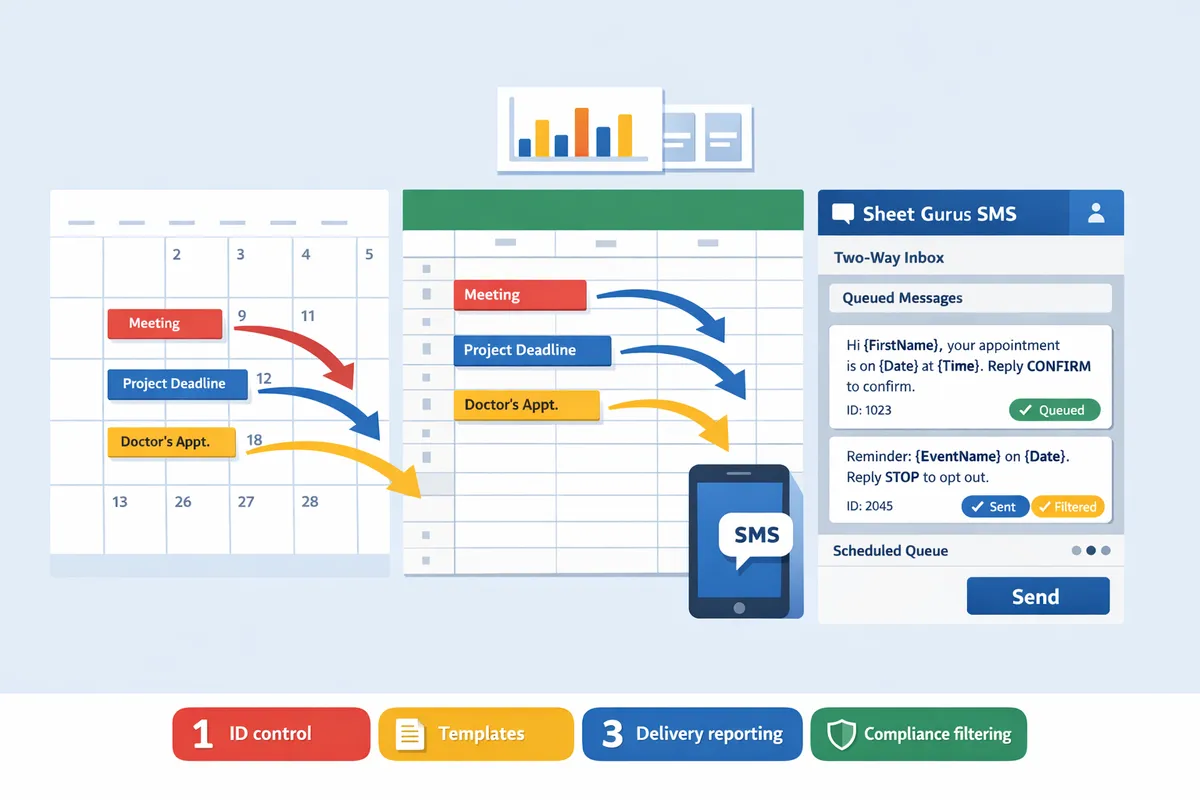
A Google Calendar SMS reminder tool is software that links calendar events with an SMS delivery system to map event fields to message templates and manage scheduling, delivery, and responses. Native Google notifications cover basic email and push alerts, while third-party tools add scheduled SMS, two-way replies, sender ID control, templates, delivery reporting, and compliance filtering. Our website tests show most small teams choose a Sheets-first add-on when they need bulk sends, two-way inboxes, and recordable consent rather than piecing together multiple apps.
What counts as native Google Calendar SMS vs third-party? 📥
Native Google Calendar notifications are limited to email and push alerts and do not include scheduled SMS or sender ID control. Google does not offer message templates, granular delivery reporting, or built-in compliance filtering for SMS. Third-party tools or add-ons add scheduled SMS, variable-driven templates, delivery status, and two-way messaging. For a side-by-side comparison of calendar marketplace apps and Sheets-based workflows, see our Google Calendar SMS apps vs Google Sheets SMS add-on comparison. Sheet Gurus SMS, as a Google Sheets add-on, provides curly-brace variables, a real-time inbox, and automatic message filtering that address gaps native calendar alerts leave open.
How do integrations typically map events to messages? 🔗
Integrations extract event fields—title, start time, attendee phone—and inject those values into SMS templates which send on a scheduled trigger. Common patterns include direct Marketplace add-ons that read events, calendar-to-sheet exports where a sheet becomes the single source of truth, and connector services that copy event rows into a messaging platform. Typical mapping uses columns like first_name, phone, event_date, and event_time to populate templates such as “Reminder: {first_name}, your appointment on {event_date} at {event_time}. Reply YES to confirm.” Scheduled triggers run X minutes or hours before an event; delivery reports and a reply inbox let teams handle confirmations and no-shows. Our Send Messages from Google Sheets guide explains these patterns and shows which approach cuts the most manual hours for small teams.
How Sheet Gurus SMS fits calendar-driven reminders
Sheet Gurus SMS is a Google Sheets add-on that schedules and sends personalized SMS using sheet rows populated from calendar exports or booking-system syncs. The add-on sends from a sidebar rather than spreadsheet formulas, supports curly-brace variables for per-recipient personalization, offers a real-time inbox for two-way replies, and applies automatic message filtering to help with compliance. Example message template you can use directly: “Reminder: {first_name}, your appointment on {event_date} at {event_time} with {provider}. Reply YES to confirm.” Use the Sending SMS from Google Sheets guide for step-by-step setup, scheduling, and monitoring. Compared with DIY copy-paste or multi-app flows, using Sheet Gurus SMS centralizes data, reduces duplicate texts, and keeps consent records alongside scheduled sends.
💡
Tip: Keep opt-in timestamps and the consent source in the same sheet before scheduling messages so you can show proof of permission if needed.
For templates and timing recommendations that reduce no-shows while staying compliant, see our Automated SMS Reminders with Google Sheets best-practices playbook and the Text Appointment Reminders use case.
Which are the best Google Calendar SMS reminder tools for 2026? (Ranked list)
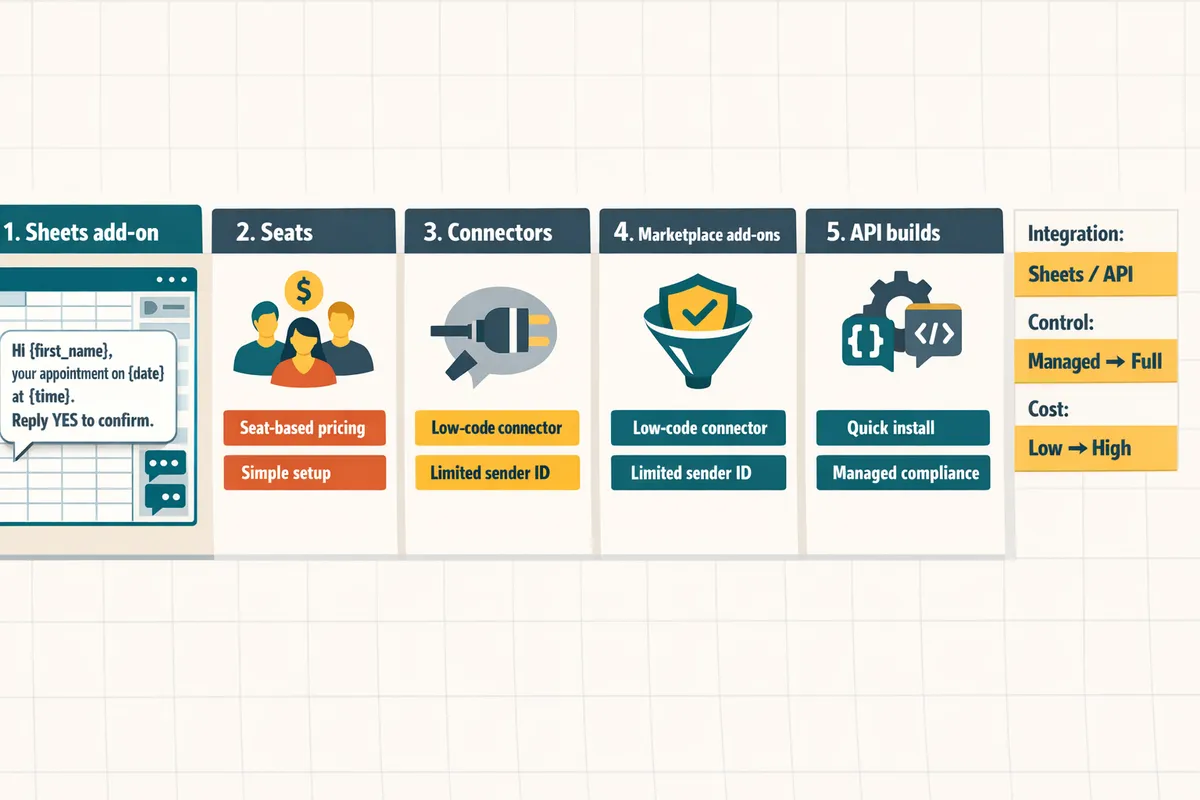
These five solution categories rank highest for SMBs by Google Calendar integration method, two-way SMS, custom sender ID support, Google Sheets compatibility, and total cost of ownership. Each entry explains fit, key features, trade-offs, and a ready-to-use example you can copy into your templates.
💡 Tip: Record opt-in timestamps and the opt-out keyword in the same sheet as contacts to simplify compliance audits and reduce chargebacks.
Sheet Gurus SMS — Best for Google Sheets users 📊
Sheet Gurus SMS is the best option for teams that keep scheduling and contact data inside Google Sheets and want fast, repeatable SMS reminders. The add-on sends messages from a sidebar rather than spreadsheet formulas, so admins avoid fragile scripts and repeated copy/paste. Key features include curly-bracket variables for per-recipient content, a real-time inbox for two-way replies, and automatic message filtering to help with compliance. Business trade-offs: minimal setup time and lower maintenance compared with Zapier flows, but pricing is per-message rather than per-seat, which usually benefits small to mid-sized teams. Example template: “Hi {first_name}, reminder: {event_title} on {event_date} at {event_time}. Reply HELP for options.” See the Sending SMS from Google Sheets guide for a step-by-step walkthrough and templates.
Compare calendar marketplace options with our Google Sheets workflow.
Seat-based calendar platforms — Best for larger teams 🧑🤝🧑
Seat-based scheduling platforms suit organizations that need unified booking, payments, and user-level support with built-in SMS. These platforms centralize appointment flows, show staff availability, and attach reminders to events while offering admin controls and reporting. Trade-offs: per-seat fees increase total cost of ownership as headcount grows, and many platforms do not integrate cleanly with Google Sheets for reporting or batch messaging. If your team wants a single vendor to handle booking and reminders, seat-based platforms reduce vendor management but may limit sender ID or two-way inbox options. Use case example: a 20-person clinic that needs consolidated billing and per-staff calendars but can accept higher recurring seat fees.
Connector services (Zapier, Make) + SMS gateway — Best for custom workflows ⚙️
Connector platforms combined with an SMS gateway deliver the most flexible automations between Google Calendar and SMS providers. You can route calendar fields to different message templates, apply conditional routing by event type, and send via regional gateways to control sender ID. Practical trade-offs include longer setup time, recurring connector costs, and fragile flows when calendar field names change. For small teams that previously built Zapier chains, Sheet Gurus SMS offers a lower-maintenance Sheets-first path that avoids multi-step connectors and reduces broken-flow risk. Example: trigger on calendar event with “Status: Confirmed,” map {ClientName} and {Location}, then send via the chosen SMS gateway.
See the add-on vs Zapier comparison in our ultimate guide.
Google Workspace Marketplace SMS add-ons — Best for quick installs ⚡
Marketplace SMS add-ons give the fastest install-and-send path when you need speed over deep customization. A typical add-on installs inside Google Workspace and starts sending scheduled reminders in minutes with minimal mapping between calendar events and message templates. Trade-offs: many lack a true two-way inbox, have limited custom sender ID control, and often do not support Sheets-first batching well. Choose a marketplace add-on when you must stand up reminders the same day and accept less control over replies and sender identity. If you later want richer Sheets workflows and a live inbox, migrating to Sheet Gurus SMS keeps your calendar exports and messaging in the same spreadsheet.
Direct API / Twilio builds — Best for developer teams 🛠️
A direct API build with Twilio or a similar provider gives full control over sender ID selection, delivery reporting, and response handling. This path supports advanced routing, regional sender numbers, and custom retry logic tied to your booking system. Business trade-offs: expect higher initial engineering cost, ongoing monitoring, and maintenance overhead compared with managed add-ons. For companies with an engineering team and strict sender ID requirements, direct builds yield maximum control. For operations-focused teams that want two-way SMS without engineering time, Sheet Gurus SMS provides inbox handling and compliance features out of the box.
Feature comparison matrix
Use the table below to match your business requirements to the right category of solution.
| Category | Integration method | Sheets support | Two-way SMS | Custom sender ID support | Inbox availability | Typical pricing model | Recommended use case |
|---|---|---|---|---|---|---|---|
| Sheet Gurus SMS | Google Sheets add-on (sidebar) | Yes, first-class | Yes, real-time inbox | Regional sender options via gateway | Built-in inbox in sidebar | Per-message / tiered plans | Small to mid teams that manage contacts in Sheets |
| Seat-based calendar platforms | Native booking + calendar | Limited (exports only) | Varies by vendor | Limited to gateway offered | Sometimes (vendor specific) | Per-seat subscription | Larger teams needing booking + payments |
| Connector services (Zapier, Make) + SMS gateway | API-based connectors | Yes (via connectors) | Possible (depends on gateway) | Yes if gateway supports it | Depends on gateway | Connector + gateway fees | Custom routing and multi-system automations |
| Google Workspace Marketplace add-ons | Workspace install | Some support, often limited | Often no (send-only) | Rarely | Rare | Low monthly or pay-as-you-go | Fast installs and simple reminders |
| Direct API / Twilio builds | Direct API integration | Yes (custom) | Yes, fully controlled | Full control | Fully custom | Engineering + usage costs | Enterprise or strict compliance needs |
How should small businesses choose the right Google Calendar SMS reminder tool?
Choose a tool by matching integration method, two-way messaging needs, sender ID control, consent handling, and total cost of ownership. Small teams that treat SMS as an extension of scheduling should prioritize solutions that reduce staff time and limit compliance risk. Our website recommends validating those five dimensions before scheduling vendor demos.
Quick-start checklist ✅
Start by confirming calendar connection method, two-way SMS requirement, sender ID control, monthly message volume, and consent ownership. Use this checklist during vendor screening to stop demos that do not meet core needs.
- Verify calendar integration: Does the tool read events directly from Google Calendar, or will you export events to Google Sheets? Our comparison of Google Calendar SMS apps vs Google Sheets SMS add-on explains tradeoffs for small teams. Sheet Gurus SMS uses a Sheets-first workflow and sends from a sidebar so scheduling and client data stay together.
- Two-way messaging: Confirm the platform offers a real-time inbox for replies and assignment of conversations. Sheet Gurus SMS provides a live inbox that keeps replies next to your spreadsheet data.
- Sender ID needs: Check whether you need a local numeric sender, alphanumeric sender, or short code and whether the vendor supports that in your region.
- Monthly volume and pricing: Estimate messages per month and ask vendors for volume tiers and carrier surcharges.
- Consent ownership: Decide who captures and stores opt-in/opt-out records (calendar app, spreadsheet, or vendor dashboard).
Decision tree and scoring matrix 🧭
Score vendors on integration friction, maintenance hours, two-way inbox, sender ID support, and cost per message to produce a ranked short list. Assign higher scores to options that reduce staff time and compliance risk.
| Category | Integration ease (1 low–5 high) | Maintenance hours / mo (estimate) | Two-way inbox (Y/N) | Sender ID support (Y/N) | Approx cost / message | Total score (higher better) |
|---|---|---|---|---|---|---|
| Sheets add-on (Sheet Gurus SMS) | 5 | 1–3 | Y | Y | $0.01–$0.04 | 28 |
| Calendar marketplace app | 4 | 2–6 | Sometimes | Sometimes | $0.02–$0.06 | 20 |
| Dedicated scheduling platform | 3 | 1–4 | Y | Sometimes | $0.03–$0.07 | 18 |
| Custom Zapier/AppScript flow | 2 | 4–10 | Depends | No | $0.03–$0.08 | 12 |
Use the table above as a decision filter. Score vendors on each criterion and drop any with an integration ease below 3 unless they offer unique value. Our website’s Send Messages from Google Sheets guide explains how we measured maintenance hours for the Sheets add-on path.
Privacy and compliance checklist ⚠️
Require explicit consent, stored opt-out logs, message filtering, and audit trails before sending SMS. These items reduce legal and reputation risk when contacting customers by text.
- Capture explicit consent with time-stamped records and the source of the opt-in (web form, signup, appointment flow). Our Automated SMS playbook shows sample consent fields.
- Maintain opt-out records and apply suppression lists at send time. Ask vendors for automated suppression so you do not rely on manual list edits.
- Use automatic message filtering and delivery audit logs to detect content that might violate local regulations. Sheet Gurus SMS includes automatic filters and delivery logs that simplify audits.
- Limit stored personal data in spreadsheets: use tokenized IDs where possible and restrict sheet access to specific roles.
💡 Tip: Always use double opt-in for SMS signups.
Read our Automated SMS Reminders with Google Sheets playbook for consent form templates and suppression list examples.
Transparent pricing and total cost of ownership
Calculate first-year TCO by adding setup fees, per-message rates, seat fees, and estimated admin hours saved. A simple TCO shows whether a paid tool pays for itself in reduced admin time and fewer no-shows.
- Collect line items: one-time setup, monthly platform fee, per-message rate, and per-seat fees.
- Add staff costs: estimate hours saved per week from automation and two-way replies. Example: saving 2 hours/week at $25/hour equals 104 hours/year worth $2,600.
- Run the math: messages/year × cost per message + annual fees + setup = gross cost. Subtract estimated staff cost saved and lost-revenue reduction from fewer no-shows to get net cost.
- Watch for hidden costs: carrier surcharges, country routing add-ons, or per-conversation fees for two-way messaging. Ask vendors for a sample invoice.
Sheet Gurus SMS reduces manual sends by scheduling directly from Google Sheets and centralizes replies in a real-time inbox, which lowers ongoing admin hours and simplifies recordkeeping. For a guided worksheet and templates, see our playbook linked above.
Implementation templates and next steps
Run a small pilot by exporting 1–2 weeks of calendar events to Google Sheets, applying a message template with variables, scheduling sends, and measuring confirmations and no-shows. This approach keeps risk low and provides measurable ROI.
- Export events: Add event fields (guest name, phone, date, time, location) into a Sheet column layout.
- Apply a message template using curly-brace variables. Example template for Sheet Gurus SMS: “Hi {first_name}, this is {business_name}. Your appointment at {time} on {date} is scheduled. Reply YES to confirm or STOP to cancel.”
- Schedule a 2-week pilot with a 20% sample of upcoming appointments.
- Monitor replies in the Sheet Gurus SMS real-time inbox and record confirmations and no-shows in the spreadsheet.
- Evaluate: confirmations, no-show rate change, and admin hours saved. If metrics improve, expand to full roster.
Use our step-by-step Sending SMS from Google Sheets guide and the Text Appointment Reminders use case for ready-to-adapt templates and a pilot checklist.
Frequently Asked Questions
This FAQ answers the most common buyer questions about integration choices, compliance, pricing, and practical workflows for Google Calendar SMS reminder tools. Each answer highlights what small businesses need to check and the next steps to validate a vendor before you buy.
Can Google Calendar send SMS natively in 2026? 📱
No. Google Calendar does not provide robust native SMS for scheduled appointment reminders in 2026. Native Google notifications still rely on push notifications and email; any SMS behavior is limited to email-to-SMS gateway workarounds that lack delivery reporting and two-way replies. For reliable scheduled texts, delivery receipts, and an inbox for replies you need a third-party tool or an add-on like Sheet Gurus SMS. See our comparison of calendar apps versus a Sheets-first workflow in google calendar sms apps vs google sheets sms add-on to weigh the trade-offs between marketplace add-ons and a spreadsheet-driven approach.
Which Google Calendar reminder tools support custom sender IDs and two-way SMS? 🆔
Support for custom sender IDs and two-way SMS depends on the vendor and the integration method; managed platforms and direct gateway integrations are most likely to provide both. Ask vendors for a demo inbox and confirmation of sender ID options for your country. Sheet Gurus SMS provides a real-time inbox for two-way replies and automatic message filtering to help with compliance; for custom sender ID availability you should confirm with the account manager since carrier rules vary by region. When evaluating, request an outbound/inbound test using your sample phone numbers and a proposed sender name.
How do I connect Google Calendar to Sheet Gurus SMS? 🔌
You export or sync calendar events into Google Sheets and then use the Sheet Gurus SMS sidebar to map event fields, add curly-bracket variables, schedule sends, and monitor replies. Typical steps: export events or use a calendar sync to populate a sheet; add columns for Phone, Consent, and {EventTime}; open the Sheet Gurus SMS sidebar; map sheet columns to message variables; schedule or queue sends. An example message using variables: “Reminder: Hi {first_name}, your appointment on {date} at {time} is scheduled. Reply YES to confirm.” Follow the step-by-step Sending SMS from Google Sheets with Sheet Gurus SMS guide for screenshots and exact field mappings.
💡 Tip: Request a demo inbox from vendors and run a five-message test to verify two-way replies and delivery timestamps before you migrate live data.
What consent and privacy steps should I take before sending reminders? 🛡️
Collect explicit opt-in, timestamp consent records, include clear opt-out instructions in every message, and avoid sending sensitive health details over SMS. For traceability, store who opted in, how, and when in the same Google Sheet you use to send messages. Sheet Gurus SMS offers automatic message filtering and audit logs to reduce compliance exposure and simplify record-keeping. For healthcare or finance reminders, redact or summarize sensitive items and instruct recipients to call or log into a secure portal for private details. See Text Appointment Reminders for guidance specific to client data handling.
⚠️ Warning: Do not transmit protected health information in SMS bodies unless you have explicit patient consent and a documented secure alternative for detailed data.
How much does it typically cost to run SMS reminders? 💰
Cost depends on message volume, per-message carrier rates, sender ID fees, and any seat or subscription charges; include estimated admin time saved when calculating total cost of ownership. A quick budgeting approach: gather per-message rates from shortlisted vendors, add monthly platform fees, and estimate staff hours saved by automating reminders. For example, a clinic sending 1,000 messages monthly at $0.05 per message with a $29 monthly subscription and 2 staff hours saved per week at $30 per hour would compare message spend of $50 plus platform cost against $240 saved in labor each month. Request sample invoices or run a 30-day pilot with Sheet Gurus SMS to measure real delivery costs and admin time saved before committing.
Can I use Google Sheets to manage reminders for multiple calendars? 📑
Yes. Google Sheets can aggregate exports from multiple calendars and act as the control sheet for scheduled SMS when paired with an add-on like Sheet Gurus SMS. Best practices: import each calendar into its own tab or include a CalendarSource column, normalize phone formats (+12223334444), and add a ConsentStatus column. Use filters or a dashboard tab to queue sends by calendar source and to track reply status in the Sheet Gurus SMS inbox. For templates, timing recommendations, and ready-to-use spreadsheets, see Automated SMS Reminders with Google Sheets: 2026 Best‑Practices Playbook + Free Templates and our beginner’s Sending SMS from Google Sheets guide.
Best next step for choosing reminders
Choose a Sheets-first SMS add-on when you need scheduled reminders, two-way replies, sender ID control, and compliance safeguards. For most small teams, keeping calendar events and client data together in Google Sheets reduces missed texts, duplicated sends, and the hours spent reconciling replies. This roundup of the best Google Calendar SMS reminder tools 2026 favors tools that cut staff time and billing risk while keeping messages auditable. Sheet Gurus SMS is a Google Sheets add-on for sending bulk SMS from a sidebar rather than spreadsheet formulas. Personalize each message with curly-brace variables such as {FirstName}, handle replies in a real-time two-way inbox, and rely on automatic message filtering to help keep your sends compliant. Compare calendar app workflows with a Sheets-first approach in our google calendar sms apps vs google sheets sms add-on article or see scheduling templates in the Automated SMS Reminders playbook. Schedule a consultation to map your Google Calendar to Sheet Gurus SMS and get a setup plan aligned to your volumes and compliance needs.
💡 Tip: Always use double opt-in for SMS signups.