




Automatic SMS Compliance Made Simple: Opt-In/Opt-Out Templates + Free Google Sheets Consent Ledger for Bulk Texting
A single opt-out violation can trigger carrier filtering and block thousands of messages during a campaign. Automatic compliance filtering for bulk sms is a system that detects opt-ins and opt-outs and prevents regulated messages from sending. Our Sheet Gurus SMS is a Google Sheets add-on that saves time by sending bulk SMS from a sidebar, not via formulas; see our
Sheet Gurus blog for related guides. It supports curly-bracket variables for dynamic content, a real-time inbox, and automatic message filtering. Example: ‘Hi {first_name}, your appointment is {date}. Reply STOP to opt-out’. This how-to guide shows how to build, test, and operate automatic compliance filtering for bulk SMS from Google Sheets using Sheet Gurus SMS, plus opt-in/opt-out templates and consent ledger. Which opt-in wording protects delivery without reducing responses?Automatic compliance filtering is a process that audits data, consent sources, and sender identity to prevent non-compliant bulk SMS. How to map your Google Sheets data and consent sources for compliance?
Map your Sheet so every row contains verifiable consent metadata and a message category that matches carrier and 10DLC rules. This lets Sheet Gurus SMS run automated checks before sending and produces traceable proof if a dispute arises.
Audit consent fields to create verifiable proof of SMS consent 📋
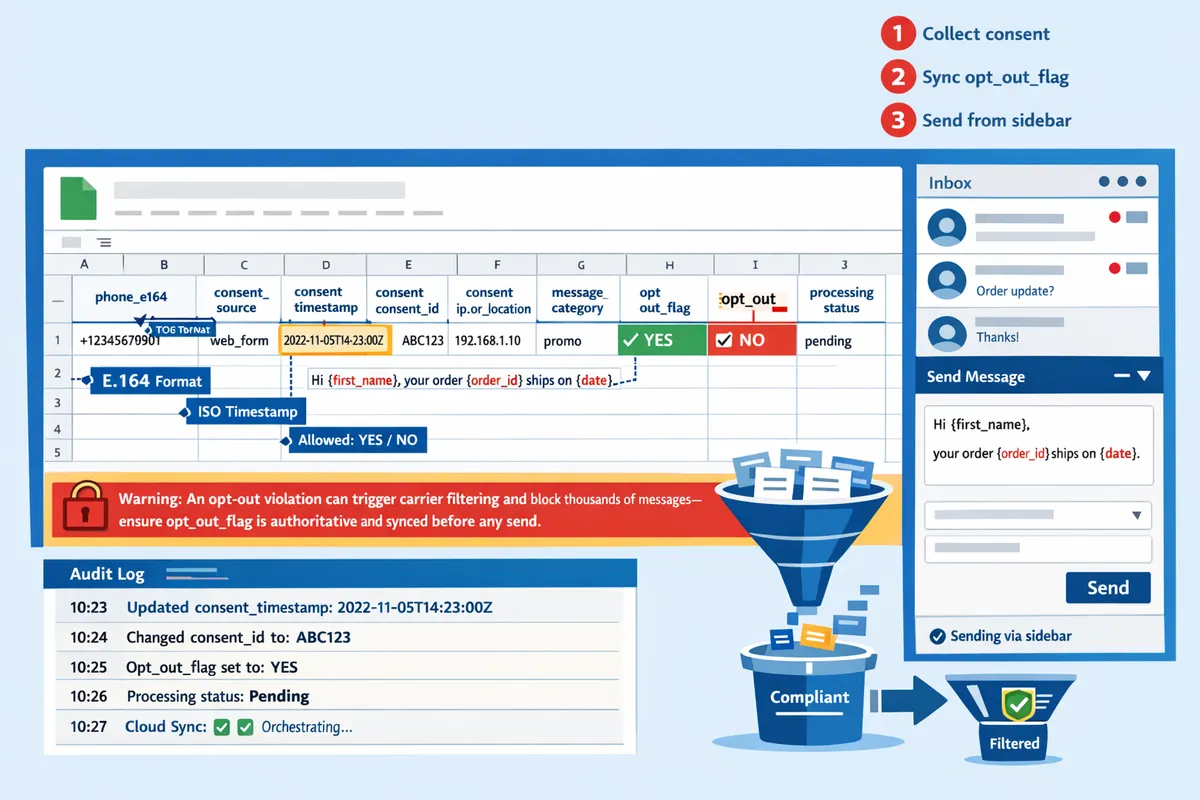
Record these exact columns and validation rules so each row proves consent. Use these column names in your Sheet and let Sheet Gurus SMS read them from the sidebar when you send.
- phone_e164. E.164 phone number (e.g., +12223334444). Validation formula example: =REGEXMATCH(A2, “^\+?[1-9]\d{1,14}$”).
- consent_source. Short label for source (web_form, paper_form, verbal, import).
- consent_timestamp. UTC ISO timestamp of opt-in. Validation: =ISDATE(C2) and ISO format enforced via data validation.
- consent_id. Web form submission ID, receipt number, or audio file ID.
- consent_ip_or_location. IP or physical location identifier for evidence.
- message_category. marketing, transactional, two_factor, appointment.
- opt_out_flag. TRUE if recipient opted out. Use checkbox validation.
- processing_status. pending, send, hold, blocked, sent.
Each field maps to audit questions: who, when, where, what. Store IDs and timestamps rather than raw files when possible to reduce storage and permission complexity. Sheet Gurus SMS uses curly-bracket variables from your Sheet (for example: “Hi {first_name}, reply YES to confirm messages from {company_name} about {message_category}.”) to preserve template context during audits.
💡
Tip: Always use double opt-in for SMS signups.
Map opt-in sources and their trust level 🗂️
Classify each opt-in source by evidentiary strength and attach a reference ID in the Sheet instead of raw attachments. Strong proof examples: authenticated web forms with submission ID, IP, timestamp, and checkbox text; medium proof: emailed consent with header; weak proof: verbal consent requiring an audio log and explicit metadata.
Practical storage approach:
- For web forms store submission_id, timestamp, and IP in consent_id and consent_ip_or_location columns. Link the submission_id to your form system in a separate internal audit table.
- For paper forms store a scanned record ID and retention policy column (link to cloud storage ID rather than embedding the file).
- For verbal consent store audio_id and call_record_timestamp; note that storing audio requires secure storage and access controls.
Operational note on DIY builds: implementing this yourself forces you to manage credential rotation, token refresh for storage APIs, quota handling for file uploads, retry logic for failed writes, and monitoring for missing proof references. Sheet Gurus SMS removes that burden by reading IDs and enforcing required fields before sends.
Retention guidance: follow legal counsel for retention length; common practice is to retain higher-trust evidence longer than lower-trust evidence and to log deletion dates in the Sheet.
Define message categories and carrier decision rules ✉️
Label each row with a message category so carrier and 10DLC rules apply correctly. Common categories include marketing, transactional, two_factor, appointment, and alerts, and each has different screening and registration requirements.
Carrier-triggered content patterns to flag:
- Marketing trigger keywords. Example regex: (?i)\b(free|prize|winner|claim|congratulations)\b.
- Shortlink and tracking link detection. Example regex: (?i)https?://\S{1,}\b or common short domains like bit.ly.
- Payment or financial solicitations often require explicit transactional labeling and extra proof.
Map categories to actions in your Sheet. For example, message_category=marketing should require consent_timestamp and consent_id and verify sender identity is a registered 10DLC brand. Sheet Gurus SMS uses the category column to apply stricter screening for marketing rows and to surface registration mismatches in the sidebar before send.
Provide an example message template for opt-in confirmation using variables supported by Sheet Gurus SMS:
“Hi {first_name}, reply YES to confirm {company_name} will send you {message_category} messages. Msg & data rates may apply. Reply STOP to opt out.”
Design a decision matrix that converts data into send/hold/error actions ✅
Use a rules-based matrix that runs checks against each row and returns send, hold, or block. The matrix should be tunable with risk thresholds and a manual review queue for borderline cases.
| Check | Pass action | Fail action | Example implementation |
|---|---|---|---|
| E.164 valid | continue | block | =REGEXMATCH(phone_e164, “^\+?[1-9]\d{1,14}$“) |
| Opt-out flag false | continue | block | opt_out_flag = FALSE |
| Consent present and recent | continue | hold | (NOW-consent_timestamp) < threshold_days |
| Consent proof ID exists | continue | hold | LEN(consent_id) > 0 |
| Category allowed for sender | continue | hold | VLOOKUP(message_category, sender_allowed_table,2,FALSE)=TRUE |
| No flagged keywords or shortlinks | continue | hold | NOT(REGEXMATCH(message_body, ”(?i)\b(free |
Decision flow example steps:
- Run E.164 and opt-out checks. If fail, mark blocked; stop. Expected outcome: blocked rows never reach carriers.
- Verify consent_timestamp and consent_id. If missing or older than your threshold, set status to hold and append review notes.
- Scan message_body for flagged content; if found, set hold for manual edit or category change.
- Check sender registration mapping for that message_category; if mismatch, hold and surface a Sheet Gurus SMS prompt to fix sender ID.
Operational costs of DIY: implementing this matrix yourself requires cron jobs, concurrency controls to avoid race conditions on status writes, backoff and retry logic for API failures, cache invalidation for updated opt-out lists, and monitoring dashboards. Sheet Gurus SMS runs these checks in the add-on, offers a manual review queue in the sidebar, and logs actions for audits so you do not have to build the orchestration layer.
⚠️ Warning: An opt-out violation can trigger carrier filtering and block thousands of messages—ensure opt_out_flag is authoritative and synced before any send.
Related reading: review our guide on Harnessing the Power of Google Sheets for SMS Communication for Sheet Gurus SMS setup, and check Effortless SMS Blasts for Effective Communication to see practical blast workflows tied to these compliance fields. For mass texting workflows that include registration and sender mapping, see Automated Text Messaging Services.
Automatic compliance filtering enforces rules in a pre-send pipeline that blocks, tags, or queues messages failing checks. How to build and test an automatic compliance filtering pipeline in Google Sheets and with Sheet Gurus SMS?
Automatic compliance filtering must run before the sending step so non-compliant rows never reach carriers. This section gives a step-by-step pipeline you can implement in Google Sheets and shows where Sheet Gurus SMS removes heavy operational work. Follow the five implementation steps below to design inputs, build checks, handle reliability, integrate the add-on, and validate with staged tests.
Step 1: How should your Sheet and triggers be structured for reliable automation? ⚙️
The sheet must include consent metadata, sender identity, and a status column so automation can make definitive decisions. Design a single sheet with one recipient per row and these minimum columns: phone, first_name, appointment_date, consent_timestamp, consent_source, sender_id, message_template, status, last_error.
- Configure status values: pending, held, queued, sent, failed. Expected outcome: automation only attempts rows marked pending or queued.
- Triggers: use a time-driven trigger for scheduled batches and an onEdit trigger that flips status to held when a manual change occurs. Expected outcome: scheduled jobs process large lists; edits pause individual rows.
- Prepare messages in the Sheet Gurus SMS sidebar using curly brackets for variables, for example: “Hi {first_name}, your appointment is {appointment_date}. Reply STOP to opt out.” Expected outcome: sidebar shows batch preview and warns on missing variables.
Refer to our guide on harnessing Google Sheets for SMS for layout examples and templates. (https://sheetgurus.com/blog/harnessing-the-power-of-google-sheets-for-sms-communication/).
Step 2: What checks and rule types should the engine run? 🧩
The rule engine should validate consent, content, and sender identity and tag failures with actionable error codes. Run these checks in order so cheap, deterministic checks short-circuit expensive ones.
- Consent checks: verify consent_timestamp exists and compare recency against your policy (for example, reject if older than X years). Tag: ERR_CONSENT_STALE.
- Opt-out membership: exact-match lookups against an opt-out table. Tag: ERR_OPT_OUT_LIST.
- Content checks: block prohibited keywords and patterns (example regex to flag SSNs or card numbers: \b\d{3}-?\d{2}-?\d{4}\b). Tag: ERR_PROHIBITED_CONTENT.
- Sender ID and 10DLC rules: confirm sender_id is registered and matches message_category. Tag: ERR_SENDER_NOT_REGISTERED.
When a rule fails, write a machine-readable error code into last_error and set status to held or failed. Expected outcome: every failure is traceable and reportable for remediation.
Step 3: What operational logic must you build for production reliability? 🔁
You must implement token refresh, quota tracking, retries with backoff, idempotency, and locking to avoid silent failures and duplicates. Building those features is non-trivial and requires ongoing monitoring and runbooks.
- Token refresh: store refresh token and refresh proactively 5 minutes before expiry.
- Quota tracking: maintain counters for daily and per-minute quotas to prevent carrier throttles.
- Retries: use exponential backoff with jitter up to a capped number of attempts; tag rows that exhaust retries as failed for manual review.
- Idempotency: generate an idempotency key per row (e.g., SG-<sheetId>-<rowId>-<sha1(message)>).
- Concurrency control: acquire a lightweight lock on the batch job to prevent two parallel runs from sending the same rows.
⚠️ Warning: Missing idempotency or locking is the most common cause of duplicate sends and carrier complaints; build both.
Example minimal pseudocode for token refresh and retry logic:
if token.expires_in < 300: token = refresh_token(refresh_token)for row in batch:try send(row, idempotency_key)except transient_error: retry with backoffexcept permanent_error: mark failed
Expected outcome: fewer silent failures and clear escalation for human intervention. Note that building monitoring, alerting, and incident playbooks is part of production reliability and requires engineering effort.
Step 4: How does Sheet Gurus SMS simplify sending and compliance enforcement? 📬
Sheet Gurus SMS handles pre-send filtering, opt-out management, and audit logs from the add-on sidebar so you do not need to build token and retry systems yourself. Our add-on validates templates, applies automatic message filtering, and logs every send and inbound reply.
Integration steps (sidebar flow):
- Open the Sheet Gurus SMS add-on sidebar inside your sheet.
- Map the phone and template columns, then preview a sample row with curly brackets.
- Run a pre-send check; the add-on tags held rows and explains error codes directly in last_error.
- Approve the batch and send. Sheet Gurus SMS enforces opt-out handling and records audit trails automatically.
Expected outcome: you push approved batches from the sidebar and Sheet Gurus SMS prevents common compliance failures without custom token/quota engineering. Read more about sending effective blasts with Sheet Gurus SMS in our SMS blasts guide. (https://sheetgurus.com/use-cases/text-blasts/)
Step 5: How should you test rules safely before full production sends? 🧪
You must run dry runs, staged rollouts, and targeted tests for false positives and negatives before full-scale sending. Implement automated dry-run modes that annotate rows instead of sending.
- Dry-run: mark rows with simulated_result and keep status as pending; expected outcome: rule coverage validated without carrier exposure.
- Staged rollout: send to an internal seed list first, then 1% of recipients, then 10%, then full list. Expected outcome: measure opt-out rates and blocked messages at each stage.
- Acceptance criteria: set thresholds for allowed false positive rate and acceptable blocked-message percentage before progressing.
💡 Tip: Always use double opt-in for high-risk lists to reduce opt-out disputes and carrier complaints.
Also run tests that intentionally trigger each error code to confirm remediation flows work and audit logs capture the failure context.
Step 6: Which option reduces operational risk and ongoing maintenance? 📊
Sheet Gurus SMS reduces ongoing engineering work compared with a DIY script or a full custom API integration by providing managed filtering, opt-out handling, and real-time inboxing. The table below compares core capabilities across three approaches.
| Capability | DIY script + Sheets | Custom API integration | Sheet Gurus SMS |
|---|---|---|---|
| Rule engine complexity | High. You must code regex, rule updates, and testing. | High. Needs a dedicated rules service and deployment cycle. | Low. Built-in filters and rule updates managed by our add-on. |
| Token & quota handling | You must implement refresh, counters, and monitoring. | You must integrate auth and quota dashboards. | Managed; no auth engineering required in your workflow. |
| Retry logic & idempotency | Must build backoff, idempotency keys, and locks. | Must design for scale and reliability. | Built-in retry and duplicate protection. |
| Carrier rule updates | Manual. Track CTIA/10DLC changes yourself. | Requires regular updates and ops. | Updated by Sheet Gurus SMS as carrier rules change. |
| Opt-out management | You must maintain and enforce lists. | Needs a central subscription service. | Automatic opt-out handling and single-click suppression. |
| Audit trails & inboxing | Limited unless you build logging and inbound processing. | You can build full audit, but it is time-consuming. | Real-time inbox and audit logs recorded by the add-on. |
| Time-to-production | Short for simple sends, long for compliant scale. | Long; engineering and QA required. | Short; sidebar-driven workflow and templates. |
Expected outcome: the table clarifies trade-offs so teams can decide between engineering cost and operational risk. For more examples of use cases, see our lead generation and mass texting resources. (https://sheetgurus.com/use-cases/lead-generation/, https://sheetgurus.com/use-cases/mass-texting/)
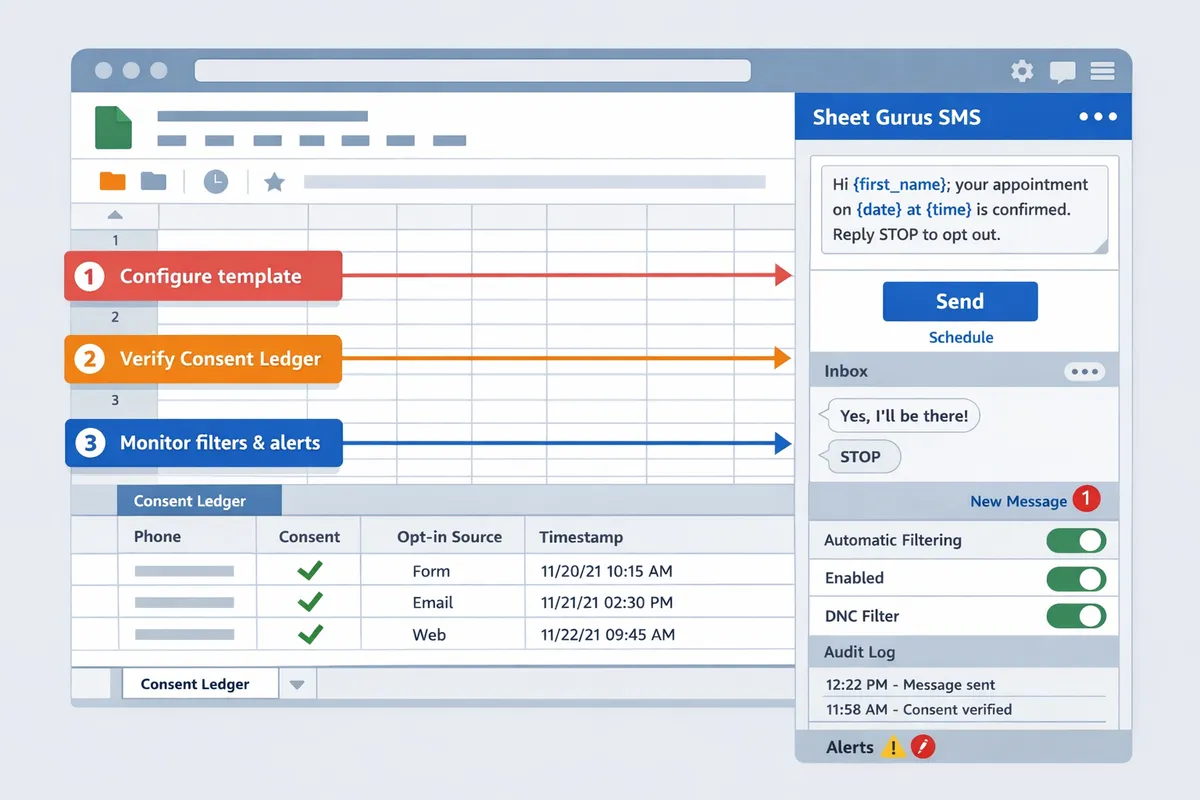
Automatic compliance filtering needs continuous logs, alerting, and clear opt-out handling to keep deliverability healthy. How to operate, monitor, and troubleshoot compliance filters for bulk SMS?
Operate filters by keeping an auditable consent ledger, monitoring defined KPIs, and following a simple incident runbook for carrier events. Sheet Gurus SMS reduces operational overhead by enforcing opt-outs, storing audit trails, and providing a real-time inbox so you do not have to build complex infra yourself. Below are step-by-step operational practices, monitoring thresholds, remediation actions, and incident procedures you can apply today.
Maintain a Google Sheets consent ledger as auditable proof. 📁
Keep a single consent ledger that timestamps opt-ins, records source IDs, captures the signup message template, and logs opt-outs for each recipient. Set up a Sheet with these columns: timestamp (UTC), phone_number, source_id (form or campaign), signup_template (text with variables), confirmation_method (single/double), opt_out_timestamp, opt_out_method, related_send_id. Use Sheet Gurus SMS to link each send attempt to the ledger row by adding a send_id to the row so you can trace any delivery back to consent evidence.
Steps to create and maintain the free ledger:
- Create the Sheet with the columns above and set timestamp to NOW only during ingestion to avoid drift. Expected outcome: every consent row is immutable after capture.
- Store raw signup text in signup_template, e.g., “You may receive messages from {organization_name}. Reply YES to confirm. Reply STOP to opt out.” Expected outcome: clear proof of language used at signup.
- Export daily snapshots as CSV and save to a secure folder for audits. Expected outcome: quick snapshot exports for carrier or regulatory requests.
- Link send attempts: add send_id and delivery_status columns populated by Sheet Gurus SMS post-send webhook. Expected outcome: end-to-end proof that a specific message used an explicit consent row.
What can go wrong and recovery:
- Mistaken overwrites. Fix: preserve original rows and add a correction_id column rather than editing historical entries.
- Missing source_id. Fix: backfill from form logs and tag rows with “backfilled” to show provenance.
Related reading: See our guide on Harnessing the Power of Google Sheets for SMS Communication for ledger templates and examples.
Monitor deliverability and compliance KPIs so you catch issues early. 📈
Track blocked message rate, opt-out rate, complaint reports, carrier rejections, and delivery latency every day with automated alerts. Use these KPIs and sample thresholds as a starting point and adjust to your traffic patterns.
Key metrics and suggested alert thresholds:
- Blocked message rate: alert if > 0.5% in a 24-hour window. Reason: carriers flag sudden spikes as abuse. Expected action: immediate triage.
- Opt-out rate: alert if > 2% per campaign. Reason: indicates poor targeting or unclear opt-in language.
- Complaint reports (recipient-initiated complaints): alert on any non-zero daily increase compared with rolling 7-day average. Expected action: pause the campaign segment.
- Carrier rejections (hard rejects from carrier): alert on any increase > 50% vs previous 24 hours.
- Delivery latency: alert if median delivery time doubles from baseline.
Operational checks (daily):
- Run a quick report from Sheet Gurus SMS real-time analytics for blocked sends and opt-outs. Expected outcome: consolidated view without manual joins.
- Cross-reference blocked send IDs with ledger rows to confirm consent provenance. Expected outcome: quick identification of problematic source_ids.
- If alerts fire, escalate to the runbook in the next section.
Integrations: use Sheet Gurus SMS analytics to reduce manual consolidation across delivery logs and your Google Sheet ledger. For more on sending workflows, review Effortless SMS Blasts for Effective Communication.
Fix common mistakes that trigger carrier filtering and blocks. 🔍
Correct common errors like mixing marketing and transactional traffic, sending from unregistered sender IDs, missing opt-out language, and reusing stale consent by following targeted remediation steps. Each error requires discrete fixes and evidence collection.
Frequent errors and precise remediation:
- Mixing message types. Fix: separate traffic by sheet and sender_id; mark each row as “marketing” or “transactional” in the ledger. Expected outcome: different workflows and templates reduce classification risk.
- Unregistered sender IDs. Fix: stop the outbound sender, register the ID with carriers (10DLC or equivalent), and re-send only after registration. What you would need to build yourself: credential management, status polling, and retry logic for sends; Sheet Gurus SMS handles these parts for you.
- Missing opt-out language. Fix: update signup templates in the ledger and send a corrective message with clear opt-out instructions; sample replacement template: “You may receive updates from {organization_name}. Reply YES to confirm. Msg rates may apply. Reply STOP to opt out.” Expected outcome: corrected consent language reduces carrier complaints.
- Reusing stale consent. Fix: run a consent recency check and initiate reconsent for rows older than your retention policy.
If you attempt a DIY fix, be prepared to implement token refresh, quota handling, exponential backoff retries, and monitoring to avoid creating race conditions or duplicate sends.
Run an incident response plan for carrier escalations and deliverability drops. 🚨
Triage carrier blocks by collecting audit logs, isolating the offending batch, suspending similar sends, and filing a carrier appeal with evidence from the consent ledger. Treat every blocking event as a high-priority incident that follows a short, repeatable runbook.
Incident runbook (numbered steps):
- Pause all sends from the implicated sender_id immediately. Expected outcome: stop further damage while you investigate.
- Gather evidence: export ledger rows related to the send_id, delivery logs from Sheet Gurus SMS, and message content templates. Expected outcome: a compact evidence package for carriers.
- Isolate offending batch by campaign and recipient pattern (same source_id, template, or time window). Expected outcome: identify the root cause.
- File a carrier appeal with the evidence package and request temporary unblocking while you remediate. Expected outcome: faster review when you provide clear proof of consent.
- Communicate to impacted recipients if required, using the real-time inbox to manage replies. Expected outcome: proactive comms reduce complaints and restores trust.
What to expect if you DIY: you must build audit logging, secure log export, retry logic to avoid duplicate appeals, and a monitoring dashboard to detect blocks in real time. Sheet Gurus SMS stores audit trails and ties delivery events to ledger rows so evidence collection is a few clicks rather than a multi-system forensics job.
Double opt-in reduces compliance risk by providing stronger consent proof. ✅
Require recipients to confirm via reply to provide stronger proof of consent and reduce dispute risk. A double opt-in capture shows an affirmative action from the recipient and timestamps that confirmation in the ledger.
Implementation steps and expected outcomes:
- Capture initial signup with source_id and signup_template in the ledger. Expected outcome: provenance of how the user entered the funnel.
- Send a dynamic confirmation message via Sheet Gurus SMS: “Reply YES to confirm messages from {organization_name}. Msg rates may apply. Reply STOP to opt out.” Expected outcome: a reply of YES creates a confirmed consent row.
- Record the confirmation timestamp and confirmation_method=“double” in the ledger and prevent sends until confirmation exists. Expected outcome: lower dispute and complaint rates.
💡 Tip: Always use double opt-in for SMS signups.
Avoid privacy risks by never sending personal health information over SMS without a documented legal basis. ⚠️
Exclude personal health information from SMS unless you have a covered, auditable legal basis and technical safeguards. SMS is not an inherently secure transport for sensitive health data and carriers will treat PHI-related complaints with heightened scrutiny.
Operational controls to implement:
- Tag PHI rows in the ledger with a “PHI” flag and add a hard-block rule in Sheet Gurus SMS filters to prevent accidental sends. Expected outcome: prevents human error causing sensitive disclosures.
- Use secure channels or one-time links for sensitive details and store the link expiration in the ledger. Expected outcome: message contains a low-sensitivity pointer rather than raw PHI.
- Maintain a documented legal basis and retention policy for PHI rows, and export audit snapshots for compliance reviews.
⚠️ Warning: Avoid sending personal health info via SMS unless you have a covered, documented legal basis.
Related resources: For practical sending patterns and template examples, see our posts on Mass Texting and Lead Generation and browse the Sheet Gurus blog for operational playbooks.
Finish consent tracking and start sending compliant bulk SMS from Google Sheets.
You now have a consent ledger and tested templates that stop accidental sends. Automatic compliance filtering for bulk sms runs checks against your Sheet ledger before messages dispatch. This gives you a repeatable safety net when sending at scale.
💡 Tip: Always use double opt-in for SMS signups.
Sheet Gurus SMS is a Google Sheets add-on for sending bulk SMS from a sidebar rather than spreadsheet formulas. Personalize each message with curly-brace variables such as {FirstName}, handle replies in a real-time two-way inbox, and rely on automatic message filtering to help keep your sends compliant.
Install Sheet Gurus SMS and follow the getting-started guide to link your consent ledger and send a test message such as “Hi {first_name}, your appointment on {date} is confirmed.” Learn more use cases and templates on our blog, including our posts on Effortless SMS Blasts for Effective Communication, Harnessing the Power of Google Sheets for SMS Communication, Lead Generation, Automated Text Messaging Services, and the blog home.
Subscribe to our newsletter for implementation tips and updates.