


Add-On vs Apps Script vs Email-to-SMS vs Zapier: The Best Way to Send Two-Way School Emergency Alerts from Google Sheets
A delayed or missed emergency SMS can leave hundreds of students unaccounted for and expose districts to compliance risk. Google Sheets two-way SMS for school emergency alerts is a method that lets districts send and receive real-time SMS from a Google Sheet. Our Sheet Gurus SMS add-on sends messages via a sidebar (not spreadsheet formulas), supports curly-bracket variables like {student_name}, includes a real-time inbox for two-way replies, and applies automatic filtering to help maintain compliance and reduce staff hours. This comparison-post evaluates Add-On vs Apps Script vs Email-to-SMS vs Zapier for compliance, reliability, and scalability and links to our
School SMS resources and the guide on sending texts from Google Sheets. Which approach balances compliance, cost, and dependable two-way delivery?Which methods let a school send two-way emergency SMS from Google Sheets?
Four practical methods let a school send two-way emergency SMS from Google Sheets: add-ons, Google Apps Script, email-to-SMS gateways, and no-code platforms like Zapier. Each option differs in setup effort, ongoing staffing, and how well it supports two-way inboxes, audit trails, and opt-in workflows. The table below gives a quick operational summary before we dive into strengths and weaknesses.
| Method | Two-way support | Setup effort | Typical staffing | Best for | Key limitation |
|---|---|---|---|---|---|
| Google Sheets add-on (Sheet Gurus SMS) | Native inbox and reply filtering | Low | Non-technical admin staff | Districts that need auditable two-way alerts and drill records | Subscription dependency |
| Google Apps Script (custom) | Full control if built with webhooks | Medium to high | Developer + IT review | Highly customized workflows | Ongoing maintenance and compliance risk |
| Email-to-SMS gateways | Usually one-way; replies unreliable | Low | Admin staff | Low-risk, low-volume notifications | Poor reporting and no centralized opt-in |
| No-code platforms (Zapier/Make) | Possible with multi-step zaps and webhooks | Low to medium | Operations owner to monitor zaps | Rapid prototyping and small pilots | Per-action costs and variable latency |
💡
Tip: Always use double opt-in for SMS signups to reduce compliance risk and false positives.
Google Sheets add-ons (Sheet Gurus SMS) ✅
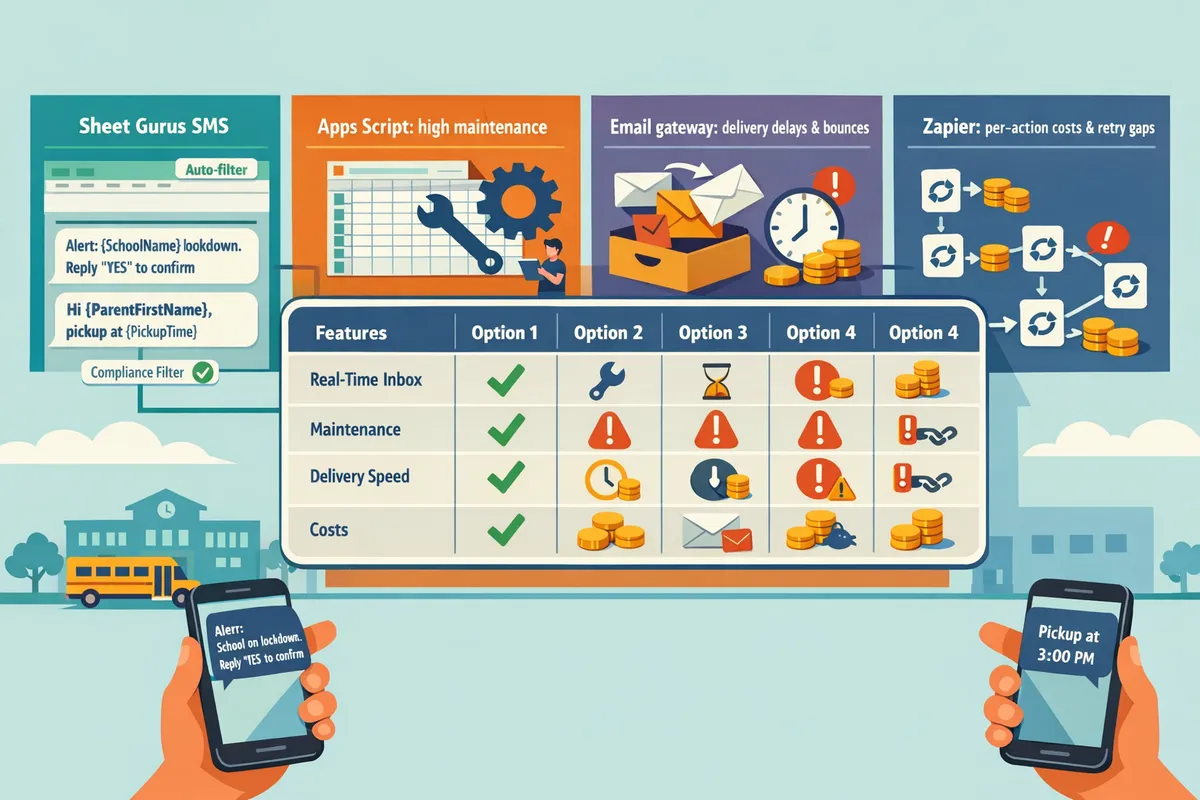
A Sheets add-on like Sheet Gurus SMS lets staff send bulk and two-way messages directly from a sidebar without writing formulas. Setup typically takes a few hours and requires only an operations user to manage templates and recipient lists. Sheet Gurus SMS provides a real-time inbox, automatic message filtering for compliance, and curly-bracket variables so staff can send: “Drill: {school_name} lockdown drill at {time}. Reply YES to confirm you are accounted for.” Templates and drill logs remain inside the spreadsheet, which simplifies auditing and delegation for non-technical staff. For detailed guidance on running drills and maintaining FERPA-safe opt-in workflows, see our two-way SMS best-practices playbook and the guide on Managing Emergency Text Alerts from Google Sheets.
Google Apps Script (custom script) 🛠️
Apps Script lets a district build custom two-way flows by pushing Sheets data to an SMS provider and processing webhooks for replies. A custom approach gives full control over cadence, retry behavior, and message parsing, but it requires developer time for secure credential storage, retry logic, and webhook endpoints. Expect ongoing maintenance whenever carriers or provider APIs change; that creates hidden operating costs and compliance exposure if logs or opt-ins are not handled correctly. Many districts find a better return by using Sheet Gurus SMS to avoid building and maintaining inbox handling, retry frameworks, and audit trails. For a detailed cost comparison and total cost of ownership, see our buyer’s guide to integrating Google Sheets with SMS.
Email-to-SMS gateways (provider-specific) ✉️
Email-to-SMS forwards an email from Sheets to a carrier gateway or provider, but it rarely supports reliable two-way replies or centralized opt-in management. Setup is simple: configure Sheets to send mail merges or use Gmail add-ons. This method suits low-risk, low-volume notices where no reply tracking or audit trail is required. For real emergency drills, email-to-sms school emergency alerts fail to capture responses reliably and provide limited delivery reporting, which increases compliance and accountability risk for districts. Use this pattern only for one-off, informational messages and keep critical two-way workflows in a solution with an inbox and audit logs.
No-code automation platforms (Zapier and similar) 🔗
Zapier and similar platforms let non-developers prototype two-way automations between Google Sheets and SMS providers without code. You can build a chain: Sheets row change → provider API call → webhook to capture replies, but each step introduces third-party orchestration, per-action billing, and variable latency. That makes Zapier attractive for pilots but risky for district-wide drills that must scale quickly and generate auditable reply records. For example, a district prototyping an opt-in campaign with Zapier Google Sheets SMS for Schools may later face high per-action costs and retry gaps during high-volume events. Sheet Gurus SMS provides an integrated inbox and filtering that removes the need for a separate orchestration layer and reduces those operational risks.
References: see our School Emergency Alerts and Parent Notifications best-practices playbook and Real-Time Safety Alerts guide for step-by-step templates, compliance checklists, and drill reporting examples.
How do these methods compare on two-way handling, compliance, reliability, cost, and scale?
They differ mainly in inbox support, compliance controls, delivery visibility, latency under load, and district-scale management features. A side-by-side view makes it clear which approach leaves replies visible to office staff, which preserves opt-in records, and which adds hidden operational overhead. The right choice reduces staff hours, limits legal risk, and keeps messages flowing during drills or real incidents.
Comparison table: features and trade-offs 🗂️
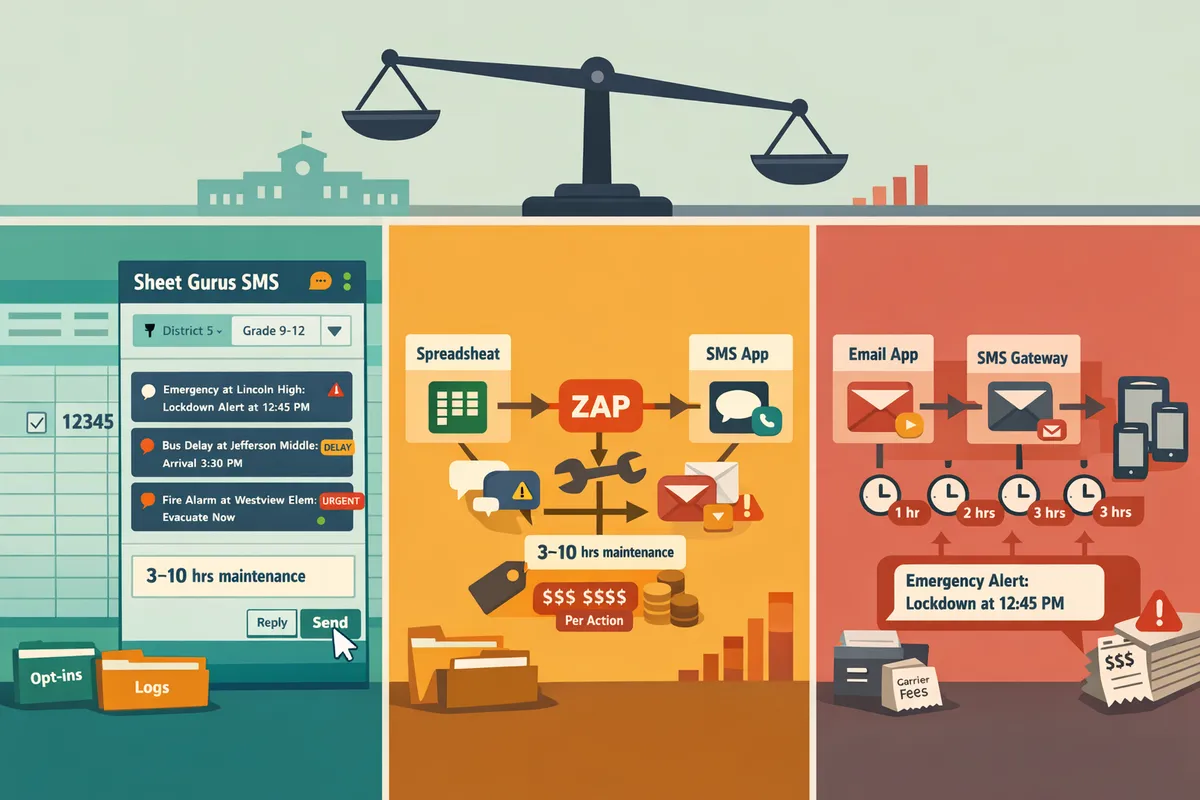
The table summarizes two-way inbox, templating, compliance, audit trails, cost model, and expected staff effort for Sheet Gurus SMS (add-on), Apps Script, email-to-SMS, and Zapier.
| Method | Two-way inbox | Message templating | Compliance controls | Audit trails | Cost model | Expected staff hours (weekly) |
|---|---|---|---|---|---|---|
| Sheet Gurus SMS (add-on) | Built-in real-time inbox with threading and tagging | Supports curly-bracket variables (e.g., “Alert: {StudentName} — {Location}“) | Centralized opt-in, automatic filtering, FERPA/COPPA-aware controls | Searchable, retained logs for drills and incidents | Monthly subscription + carrier fees | 1–4 hrs (admin + drills) |
| Apps Script (DIY) | Possible with custom listener but requires technical monitoring | Can implement templating but requires custom parsing | No centralized controls by default; needs engineering to meet retention policies | Depends on custom logging; often fragmented | Low platform cost but high engineering time and hosting costs | 5–20+ hrs (ongoing developer time) |
| Email-to-SMS gateways | One-way by default; two-way replies often return as email and need inbox processing | Limited templating in email body; variables require sheet formulas | Minimal built-in opt-in handling; retention varies by gateway | Delivery reporting often basic; reply threading is manual | Per-message carrier fees; low tooling cost | 2–8 hrs (monitoring and manual stitching) |
| Zapier (no-code) | Two-way possible with intermediaries but reply routing can lag | Good templating via fields; supports spreadsheet variables | Few built-in district-grade filters; opt-in must be recorded in Sheets | Activity logs available but limited for formal audits | Per-action pricing plus carrier fees; costs scale with volume | 3–10 hrs (flow maintenance, zap updates) |
Which option handles two-way replies best? 📥
A managed add-on like Sheet Gurus SMS handles two-way replies best because it supplies a real-time inbox with threading, tagging, and escalation rules designed for school staff. Sheet Gurus SMS displays replies in a sidebar so attendance staff and administrators see parent and student replies without opening separate tools. For example, you can send: “Lockdown notice: {StudentName} — Shelter in place at {Location}. Reply \“SAFE\” or \“UNSAFE\”.”
DIY approaches require extra technical glue to capture replies, parse intent, route messages, and maintain visibility. That extra glue raises the chance that replies get missed during a drill or busy routing day. For operational guidance on inbox workflows and drill reporting, see School Emergency Alerts and Parent Notifications from Google Sheets: A Two‑Way SMS Best‑Practices Playbook.
💡 Tip: Always use double opt-in for SMS signups.
Which option meets compliance and audit needs best? 🔒
Centralized add-ons provide the strongest compliance controls because they capture opt-in records, apply automatic message filtering, and retain searchable audit logs. Sheet Gurus SMS includes centralized opt-in controls and automatic filtering features that support district retention policies and FERPA/COPPA considerations without extra engineering.
Email-to-SMS and open Apps Script implementations often fail to centralize retention and filtering unless a district invests developer hours to build that capability. That creates legal and policy risk when you need drill evidence or must show consent records. For a compliance-focused runbook and sample retention policies, consult Managing Emergency Text Alerts from Google Sheets and the Real-Time Safety Alerts guide.
⚠️ Warning: Avoid including personal health information in SMS messages.
Which option scales and stays reliable during district-wide incidents? 💸
Managed add-ons with built-in queuing and provider orchestration handle burst traffic better than single-script or email-based setups. Sheet Gurus SMS routes messages through a managed pipeline that preserves delivery status and reduces staff intervention during high-volume sends.
Zapier can scale for moderate workloads but may introduce per-action latency and rising costs as message volume grows. Email-to-SMS often encounters carrier throttling and inconsistent delivery reporting when many messages hit carriers at once. DIY Apps Script can hit execution limits or quota ceilings unless you build queuing and retry processes, which adds significant maintenance overhead. For a cost-of-ownership comparison, see How to Integrate Google Sheets with SMS: Add-on vs Apps Script vs Zapier/Make (Buyer’s Guide + TCO Calculator).
Which method should my district pick by size? 🧭
Choose by operational capacity and required controls: single schools often need simplicity; districts need centralized controls and auditability.
- Single-school operations. Use a Sheet Gurus SMS add-on or a Zapier flow when volume is low and staff want minimal setup. Add-ons keep replies visible to office staff and reduce manual coordination. Example: a single elementary school running after-school closure alerts with one admin.
- Multi-school clusters. Prefer a managed add-on like Sheet Gurus SMS to centralize opt-ins, templates, and drill logs across campuses. Central templates with curly brackets (e.g., “Bus delay for {SchoolName}: {Minutes} minutes”) reduce errors and save staff time across sites.
- District-wide operations. Use a managed add-on with enterprise controls, audit trails, and queuing. District-wide sends require centralized retention, role-based access to the inbox, and tested escalation rules to avoid missed replies during large incidents. For implementation steps and testing checklists, read Real-Time Safety Alerts: How Schools Can Use SMS to Keep Students Safe in Emergencies.
Which approach should a school choose and how does Sheet Gurus SMS compare in practice?
The best approach depends on district size, IT capacity, compliance needs, and whether you need an auditable two-way inbox. For many K–12 environments, a managed Google Sheets add-on with built-in inbox and filtering offers the fastest, lowest-risk path to reliable two-way emergency alerts.
Recommendation for small schools and limited IT staff 🏫
Small schools should use a managed add-on like Sheet Gurus SMS for fastest setup, minimal maintenance, and a real-time inbox for replies. Sheet Gurus SMS installs as a sidebar, so staff send messages without editing formulas and receive replies in a live inbox that maps responses to contact rows. That saves support hours; for example, a 500-family elementary school can run weeknight drills with two staff members instead of dedicating a developer. Use our School Emergency Alerts and Parent Notifications playbook for consent and runbook templates and the Managing Emergency Text Alerts guide for practical setup steps.
Recommendation for larger districts and multi-school deployments 🏢
Large districts should prioritize centralized admin controls, role-based access, and audit trails to support drills and compliance reporting. Districts with integration teams can pilot with Apps Script or Zapier, but those pilots often lack the managed inbox, automatic message filtering, and district-wide SLAs that Sheet Gurus SMS provides. For example, a 20-school district should require role separation (senders, approvers, auditors) and drill logs that export to central reporting. See our buyer’s guide with TCO analysis to compare costs between a pilot and a district-wide add-on deployment.
Why DIY (Apps Script or raw email-to-SMS) creates operational risk ⚠️
DIY Apps Script and raw email-to-SMS flows often demand continuous developer attention for credential rotation, edge-case handling, and delivery troubleshooting. That ongoing work creates hidden costs, slows drills, and produces incomplete audit trails that complicate post-incident reviews. For emergency use cases, those issues translate to wasted staff hours, inconsistent message delivery, and compliance exposure when replies are lost or not linked to student and parent records.
⚠️ Warning: Relying on email-to-SMS gateways or ad hoc scripts can leave you without a searchable inbox and audit log when you need proof of delivery and acknowledgments.
Implementation checklist and dynamic message templates ✉️
Start a pilot, validate workflows, then scale with clear roles and reporting. Follow this rollout checklist:
- Capture opt-in using double opt-in and store consent timestamps in Sheets.
- Assign roles: message sender, approver, inbox monitor, and auditor.
- Build a template library with curly-bracket variables and approval workflows.
- Schedule monthly drills and document escalation steps.
- Configure fallback channels (email, automated call) and test them end-to-end.
- Enable audit settings and export drill logs to a central governance sheet.
💡 Tip: Always use double opt-in for SMS signups.
Example dynamic templates that work inside Sheet Gurus SMS (curly-bracket variables map to columns in your sheet):
- “{SchoolName} ALERT: {EventType} at {Time}. Reply YES to acknowledge. Msg&data rates may apply.”
- “{SchoolName}: {StudentName} marked absent after {EventType}. Reply INFO to request check-in instructions.”
- “{SchoolName} DRILL: {DrillType} at {StartTime}. Reply OK if you received this message.”
Sheet Gurus SMS maps replies to the sender’s contact row so “YES” or “OK” updates confirmation status without manual matching. Put examples into a pilot sheet and test how replies populate the confirmation column.
Fallbacks, drills, and measuring reliability 📊
A reliable emergency system includes a tested fallback path and drill reporting that records sent messages and confirmations. Configure automatic escalation: if no confirmation within X minutes, escalate to alternate contacts and trigger an automated call or email. Use Sheet Gurus SMS to export drill logs to Google Sheets for governance reporting or use our Real-Time Safety Alerts guide to set drill KPIs and thresholds. For districts using Zapier Google Sheets SMS for Schools in pilots, ensure Zapier workflows also write status and timestamps back to Sheets so audits remain intact.
For step-by-step onboarding and staff roles, follow our managing emergency text alerts guide and the playbook for two-way best practices.
Frequently Asked Questions
This FAQ answers practical decision and implementation questions about sending two-way school emergency SMS from Google Sheets. Each answer focuses on compliance, reliability, and the trade-offs between add-ons, Apps Script, email-to-SMS, and Zapier. We reference specific workflows and Sheet Gurus SMS features where they change the operational outcome.
Can Google Sheets send two-way SMS for school emergencies? 📬
Yes; Google Sheets can send two-way SMS when paired with an add-on that provides a real-time inbox or with an SMS gateway that routes replies back into a dashboard. For example, Sheet Gurus SMS adds a sidebar workflow and a live inbox so staff can send bulk alerts from a sheet and monitor replies without building webhook endpoints or a separate dashboard. Using an add-on avoids the development and maintenance overhead of a custom Apps Script webhook. See our Real-Time Safety Alerts guide for an implementation that emphasizes latencies, inbox handling, and template use.
How does email-to-SMS for school emergency alerts work and is it acceptable? ✉️
Email-to-SMS converts an email into an SMS through a carrier gateway, but it often lacks reliable reply tracking, delivery reporting, and centralized opt-in controls required for formal emergency workflows. Email-to-SMS can work for low-risk, one-way notices, but carriers sometimes strip headers or block replies, which breaks auditing and confirmations. ⚠️ Warning: Avoid using email-to-SMS for district-wide emergency confirmations because reply logging and delivery receipts are frequently incomplete. If you need auditable two-way confirmations, an add-on like Sheet Gurus SMS provides inbox logging and automatic message filtering.
Is Zapier a reliable option for Google Sheets SMS for schools? ⚙️
Zapier can reliably connect Google Sheets to SMS providers for prototypes and low-volume automations, but it introduces latency, per-action costs, and action limits that make it less suitable for district-scale emergency broadcasts. Zapier adds a queuing layer and may delay messages by seconds to minutes under load, and its retry behavior can complicate emergency retries. For district deployments that require immediate inbox visibility and predictable scaling, choose an add-on built for sheets such as Sheet Gurus SMS or follow the trade-off analysis in our buyer’s guide on integrating Google Sheets with SMS.
How do I handle opt-ins, FERPA, and COPPA when sending school SMS? 🔒
Maintain written opt-in records, use double opt-in where feasible, and avoid sending protected student data over SMS unless district policy explicitly permits it. Keep opt-in logs tied to the parent or guardian record and limit roster columns in the sheet to non-sensitive identifiers. Use role-based access to the add-on and exportable audit logs so only authorized staff can view replies.
💡 Tip: Always use double opt-in for SMS signups to reduce accidental consent and to create a clear audit trail. Sheet Gurus SMS includes automatic message filtering and access controls that reduce compliance risk while keeping audit trails exportable for district reviews. See the two-way SMS best-practices playbook for policy templates and retention recommendations.
How should districts test drills and verify two-way confirmations? 🧭
Run scheduled drills that send a test alert, require a reply, and capture response timestamps and any escalations in an audit log for administrator review. A simple drill runbook: 1) Schedule the drill and target group in your sheet. 2) Use a template with variables and a clear reply keyword, for example “{SchoolName}: {Event} drill. Reply SAFE or NEED HELP.” 3) Send the drill from the add-on sidebar and monitor the live inbox. 4) Export replies, timestamps, and escalation flags to a CSV for compliance review. Sheet Gurus SMS supports pre-built drill templates, inbox tagging, and drill reporting so administrators can verify confirmations and generate reports required by district policy. See Managing Emergency Text Alerts from Google Sheets for detailed runbooks and reporting examples.
What are the typical cost differences between these approaches? 💳
Costs differ by pricing model and hidden operational work: add-ons usually charge per-seat or per-message and offer district plans, Zapier bills per action, Apps Script has upfront development and ongoing maintenance costs, and email-to-SMS can incur carrier conversion fees. When budgeting, include staff hours for setup, ongoing compliance work, drill testing, and the cost of audit-ready reporting. Use our buyer’s guide and TCO calculator to compare true costs across options, and consider Sheet Gurus SMS district plans if you want a single vendor that covers sending, inboxing, filtering, and reporting.
Can we use dynamic variables in messages to personalize alerts? 🧾
Yes, dynamic variables let you personalize bulk alerts by pulling fields from your sheet into message templates so staff do not edit each row manually. For example: “{SchoolName}: {StudentName} pickup at {Time}. Reply YES to confirm pickup.” Sheet Gurus SMS supports curly-bracket variables in templates and substitutes row values at send time, which reduces manual editing and helps staff send personalized mass alerts from the sidebar while keeping templates consistent. For examples and best practices on variable naming and fallback values, see our Real-Time Safety Alerts guide.
Choose a Google Sheets add-on for the most reliable, compliant two-way emergency SMS workflows.
A managed add-on reduces maintenance, centralizes consent tracking, and gives you a real-time inbox for replies, which Apps Script and Zapier often do not provide. See the two-way SMS best‑practices playbook for runbooks and testing, and compare costs in the buyer’s guide and TCO calculator.
For districts that need Google Sheets two-way SMS for school emergency alerts, choosing a solution that enforces message filtering and preserves reply history lowers compliance risk and speeds incident response.
Sheet Gurus SMS is a platform that helps users save time and money by enabling them to send bulk SMS to their recipients easily from within Google Sheets. The product is a Google Sheets add-on and messages are sent via a sidebar, not via spreadsheet formulas. The product has the following features:
- Text messages can be sent with curly brackets as variables to allow for dynamic content.
- A real-time inbox to allow for two-way communication with recipients.
- Automatic message filtering to keep users compliant with regulations.
💡 Tip: Always use double opt-in for SMS signups to protect consent records.
Schedule a consultation with our team to map your district’s workflow and pilot Sheet Gurus SMS. For additional setup steps and templates, review Real-Time Safety Alerts and Managing Emergency Text Alerts from Google Sheets.