




10DLC Campaign Rejection Reasons 2026
One rejected 10DLC campaign can delay a rollout for weeks and cost thousands in lost engagement. 10DLC campaign rejection reasons 2026 is a list that explains why carriers reject A2P 10DLC campaigns under 2026 rules and which fixes reclaim delivery. This article ranks the top rejection reasons, provides step-by-step fixes, ready-to-send SMS templates using {FirstName} variables, and a practical recovery playbook you can apply from day one. Sheet Gurus SMS is a Google Sheets and Microsoft Excel add-on that sends messages from a sidebar (not spreadsheet formulas), supports curly-brace variables, includes a real-time two-way inbox, and applies automatic message filtering to reduce compliance risk and save time and money. For compliance background, read our
SMS compliance guide for Google Sheets and the practical text-blast workflow. Which rejection causes drain budgets fastest, and which template recovers delivery most reliably?1. How do 10DLC campaign rejections work in 2026?
Carriers and registration partners reject 10DLC campaigns in 2026 when registration data, message content, or consent evidence fails updated carrier vetting rules. These rejections block a campaign from sending until the flagged fields are corrected and the campaign is resubmitted. Understanding which fields carriers review and where delays occur reduces resubmission cycles and lost engagement.
What is a 10DLC campaign rejection? 📛
A 10DLC campaign rejection is a regulatory action that prevents a messaging campaign from sending because required registration documentation, message intent, or opt-in evidence is missing or noncompliant. Typical rejected fields are the campaign description, sample messages, destination URLs, and proof of consent (timestamped opt-ins, double opt-in records, or clear web form logs). For example, a campaign marked as ‘promotions’ but containing transactional language or unclear opt-out instructions will most often be rejected for mismatched intent; the fix is to update the campaign description and provide representative sample messages that match the use case.
Sheet Gurus SMS helps reduce common content mismatches by applying automatic message filtering before send and by supporting curly-brace variables like {first_name} so you can show carriers accurate sample messages (for example: ‘Hi {first_name}, your pickup is at 3:00 PM. Reply STOP to opt out.’). For registration steps and required fields, see our 10DLC registration guide for Google Sheets senders.
Who enforces rejections and which parties review submissions? 🏛️
Carriers and their registration partners enforce 10DLC policies and run automated and manual reviews that check use case, content, and consent. Reviews may run at the carrier level, at aggregators that route traffic, or at registration partners that collect and validate brand/campaign paperwork. Knowing who flagged a rejection matters because a carrier-level block requires different evidence than a registrar-level request for additional documentation.
Practical example: if a registrar requests enhanced consent evidence, provide timestamped web form exports and message flow screenshots; if a carrier flags content, revise sample messages and remove disallowed content before resubmitting. Sheet Gurus SMS reduces false positives by filtering messages against policy patterns before you send, which lowers the chance an automated carrier check will flag your campaign. For broader compliance context, review our SMS compliance guide for Google Sheets.
What is the 10DLC approval timeline 2026? ⏳
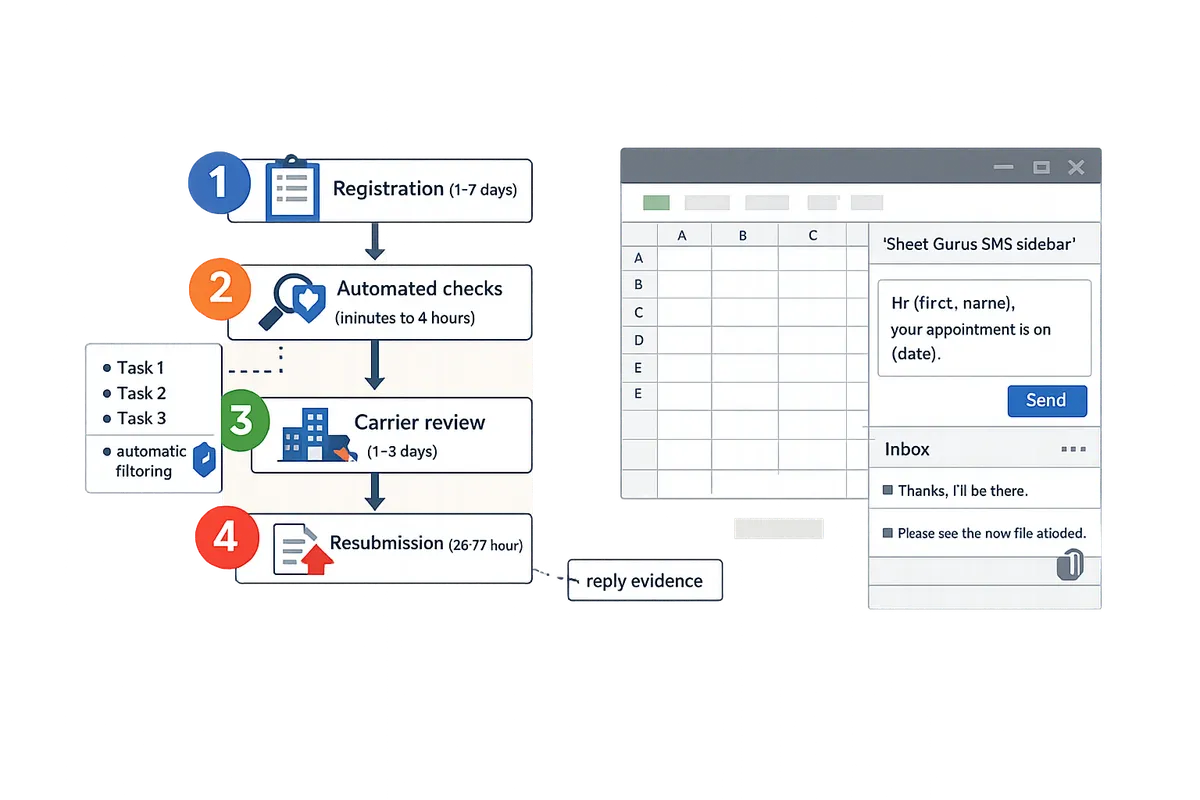
The 10DLC approval timeline 2026 ranges from a few days for simple marketing campaigns to several weeks for complex or escalated reviews. Initial vetting for straightforward brand and campaign registrations typically completes within 2 to 5 business days; campaigns requiring manual review, legal checks, or escalations commonly add 7 to 21 business days. Plan timelines around the complexity of your use case and the type of evidence requested.
A practical resubmission workflow to shorten delays:
- Identify the exact rejected fields listed in the registrar or carrier notice.
- Collect matching evidence (sample messages, opt-in logs, consent timestamps, destination landing page screenshots).
- Update the campaign description and sample messages to match the provided evidence.
- Resubmit and set a 48-hour internal SLA to check for follow-up requests; escalate to the registration partner if you receive no status update.
💡
Tip: Always use double opt-in for SMS signups. This creates clear timestamps and reduces the most common consent-related rejections.
Sheet Gurus SMS helps with timeline management by preventing common pre-send issues: automated message filtering lowers the chance of content rejections, and the real-time inbox captures reply evidence you can attach during resubmission. If you need a step-by-step registration walkthrough for Google Sheets senders, follow our registration how-to for 10DLC.
2. Which 10DLC campaign rejection reasons are most common in 2026, and how do you fix them?
These are the ten rejection reasons carriers cite most often in 2026 and the exact fixes you should apply before resubmitting. Apply the checklist items below to reduce manual reviews and shorten approval time.
Vague or mismatched campaign description 🚫
Carriers reject campaigns when the declared use case does not match sample messages or the linked landing page. Provide a single, crisp one-sentence use case that exactly matches every sample message and the disclosure URL. For example: ‘Delivery updates for Acme Logistics drivers about scheduled pickups and ETA changes.’ Then do the following:
- Replace boilerplate phrases like ‘promotions and updates’ with the single use case sentence in both campaign description and all sample messages.
- Ensure the landing page headline and the SMS disclosure use the same phrasing.
- If you use Sheet Gurus SMS, place that one-sentence use case in the campaign notes field so the registration packet shows the same language the carrier sees.
Missing or unclear consent (opt-in) ✅
Carriers reject campaigns when opt-in flows lack explicit language, timestamps, or storage details. Include the exact opt-in text, the timestamp format you store, and where you keep records when you resubmit. Best practices:
- Show the exact opt-in copy you use (example below).
- State your storage location: the Google Sheet column name and retention policy.
- Attach a CSV or screenshot with three recent timestamped opt-ins.
Example opt-in text to document: ‘I agree to receive SMS alerts from Acme Logistics about delivery status. Msg frequency: up to 6/month. Reply STOP to opt out.’ Use {first_name} in your user-facing preview so the carrier sees how personalization works in practice. Sheet Gurus SMS sends with curly-brace variables like {FirstName}, and you should store opt-in timestamps in the same sheet row used for sending.
Disallowed content or restricted verticals ⚖️
Carriers block campaigns that include disallowed content or restricted verticals without industry disclaimers. If your vertical needs extra legal language, attach a short compliance note and the exact copy used in messages and disclosures. Steps to fix:
- Identify the vertical (healthcare, financial, gambling) and list the exact disclaimer you add to messages.
- Provide a one-paragraph legal justification if you rely on an exception (for example, transactional health reminders).
- Attach the landing page with the disclosure visible above the fold.
When you use Sheet Gurus SMS, apply automatic message filtering before sending to catch prohibited terms and reduce rejections.
Inconsistent or broken URLs (privacy, terms, opt-out) 🔗
Carriers reject campaigns where disclosure, privacy, or opt-out URLs are missing, unreachable, or contain dead links. Provide HTTPS pages with a clear SMS privacy statement and visible opt-out instructions. Fix checklist:
- Verify each URL returns 200 OK and is reachable from a public browser.
- Put an SMS-specific privacy snippet on a single page (not buried in PDFs).
- Show the exact path to opt-out instructions and include a visible Reply STOP example.
Link your campaign disclosure to the same URL used in your sample messages. If you registered via a Google Sheets workflow, reference the registration guide in the resubmission notes: 10DLC Registration: Google Sheets SMS Senders (2026).
Sample messages that look like promotional spam ✉️
Carriers flag sample text that uses sensational or generic promotional language. Use concise, specific sample messages that state the organization, the purpose, and the call to action. Fixes:
- Replace phrases like ‘Act Now! Limited Time’ with clear purpose lines: who, what, when.
- Include dynamic variables to show personalization: e.g., ‘{FirstName}, Acme Logistics: Your delivery for order {OrderID} is scheduled today 2–4PM. Reply STOP to opt out.’
- Provide 3–5 representative messages showing transactional and marketing variants.
See our library of compliant examples for formats that pass review and how Sheet Gurus SMS handles curly-brace variables in sends.
Incorrect or missing business identity information 🧾
Carriers reject registrations when the legal business name, DBA, or EIN do not match uploaded documents. Upload documents that match exactly and point reviewers to the fields that confirm identity. Action steps:
- Upload a single PDF with your Articles of Organization or business tax form.
- Highlight (using comments in the PDF or a short cover note) the lines that show legal name and EIN.
- If you operate multiple DBAs, submit separate registrations per DBA with unique campaign descriptions.
Use Sheet Gurus SMS to label campaigns clearly; include the same legal name in the campaign title as on your documents so the carrier reviewer can cross-check quickly.
Reused or duplicated campaign descriptions across brands 🔁
Carriers flag identical campaign descriptions used across separate brands. Provide a unique, brand-specific description and avoid boilerplate. Fix process:
- Create a 20–30 word, brand-specific description for each campaign.
- Show two sample messages per campaign that reflect that brand’s voice.
- Upload proof of brand control (website or DBA certificate) if the brand differs from the registered legal name.
Duplicated text increases manual reviews; unique descriptions reduce friction and speed approval when you submit from your Google Sheet.
Opt-out handling and reply management gaps 📩
Carriers reject campaigns that lack a reliable opt-out mechanism or a documented reply handling plan. Demonstrate automated opt-out handling and how replies are processed. Required items:
- Show the standard opt-out string used (Reply STOP) and the automated flow that removes the number from sends.
- Describe who monitors replies and the SLA for manual follow-up.
- Provide screenshots or a short video showing the inbox handling.
Sheet Gurus SMS includes automated opt-out and a real-time two-way inbox so you can show exactly how replies are captured and how the system prevents further sends to opted-out numbers.
Unsupported message flows and automation concerns 🤖
Carriers reject automated or trigger-based flows without clear evidence the user initiated the interaction. Explain triggers and provide examples of user initiation. What to include:
- Plain-language trigger logic: e.g., ‘Trigger: user places order and agrees to SMS at checkout.’
- Three sample flows showing the user action and the exact message that follows.
- Evidence of opt-in tied to the trigger (screenshot or CSV row with timestamp).
If you use scheduled sends from Sheet Gurus SMS, note where the schedule is set and attach an example row from your Google Sheet showing the trigger column and timestamp.
Agent or aggregator documentation gaps 🗂️
Carriers delay approvals when reseller or aggregator attestations are missing. Include a signed attestation or a clear aggregator contact and show who owns compliance. Fix items to attach:
- A one-paragraph attestation signed by the aggregator or reseller.
- Contact name, email, and phone for compliance follow-up.
- A short note clarifying whether the aggregator or the brand handles opt-out processing.
When registering from Google Sheets, place the attestation file and aggregator contact details in the campaign notes so Sheet Gurus SMS can send a complete packet.
10DLC sample messages that pass review ✅
The best sample messages are short, specific, and include organization, purpose, and opt-out instructions. Use these templates and explain why each passes review:
- Transactional example: ’“{FirstName}, {Business}: Your delivery for order {OrderID} is scheduled today 2–4PM. Reply STOP to opt out.“’ (why it passes: identifies sender, states purpose, includes opt-out)
- Appointment example: ’“{FirstName}, {Business}: Your appointment on {ApptDate} at {ApptTime} is confirmed. Reply RESCHEDULE to change or STOP to opt out.“’ (why it passes: confirms a scheduled service)
- Marketing example: ’“{FirstName}, {Business}: New arrivals in your size. Shop now at example.com. Reply STOP to opt out.“’ (why it passes: shows brand and CTA; avoid overly promotional language)
Include 3–5 variants per campaign and submit them with the campaign packet. Sheet Gurus SMS supports curly-brace variables like {FirstName} and {OrderID}, which carriers expect to see for personalization.
Industry checklists for opt-in, disclosure, and URL requirements 🧰
Different verticals require different documentation and disclosure phrasing; provide a checklist for each. Below are condensed checklists for four common verticals.
| Vertical | Required opt-in language | Mandatory disclosure | Acceptable URL contents |
|---|---|---|---|
| Retail | Consent to receive promotional and transactional offers; frequency estimate | Link to returns and privacy plus SMS opt-out info | Visible opt-out, contact info, basic privacy text |
| Healthcare | Explicit appointment or reminder consent; HIPAA note if PHI is present | Statement on limited PHI use and how to opt-out | Secure contact page, limited PHI guidance |
| Finance | Consent tied to account alerts or transactional notices | Statement on account security and prohibited content | Clear customer support route and privacy statement |
| Delivery/Logistics | Consent for delivery updates and driver contact | Statement on driver contact methods and opt-out | Tracking page and SMS privacy snippet |
Attach the applicable checklist page URL and one sample message per checklist item. For Google Sheets senders, our registration guide for Google Sheets SMS senders explains how to map these fields into your sheet: 10DLC Registration: Google Sheets SMS Senders (2026).
Tip: quick pre-submission QA you should run 🔍
Run a short pre-submit checklist that verifies matching use case, reachable URLs, explicit opt-in text, and at least three representative sample messages with variables.
💡 Tip: Run a pre-submission checklist that verifies matching use case, reachable URLs, explicit opt-in text, and at least three representative sample messages with dynamic variables such as {FirstName} and {OrderID}.
Suggested steps:
- Open your Google Sheet used for sends and confirm opt-in timestamps exist for three recent contacts.
- Paste your one-sentence use case into the campaign notes field in Sheet Gurus SMS.
- Run the add-on’s automatic message filter and resolve any flagged terms before you submit.
3. How do you recover a rejected 10DLC campaign and resubmit for fastest approval?
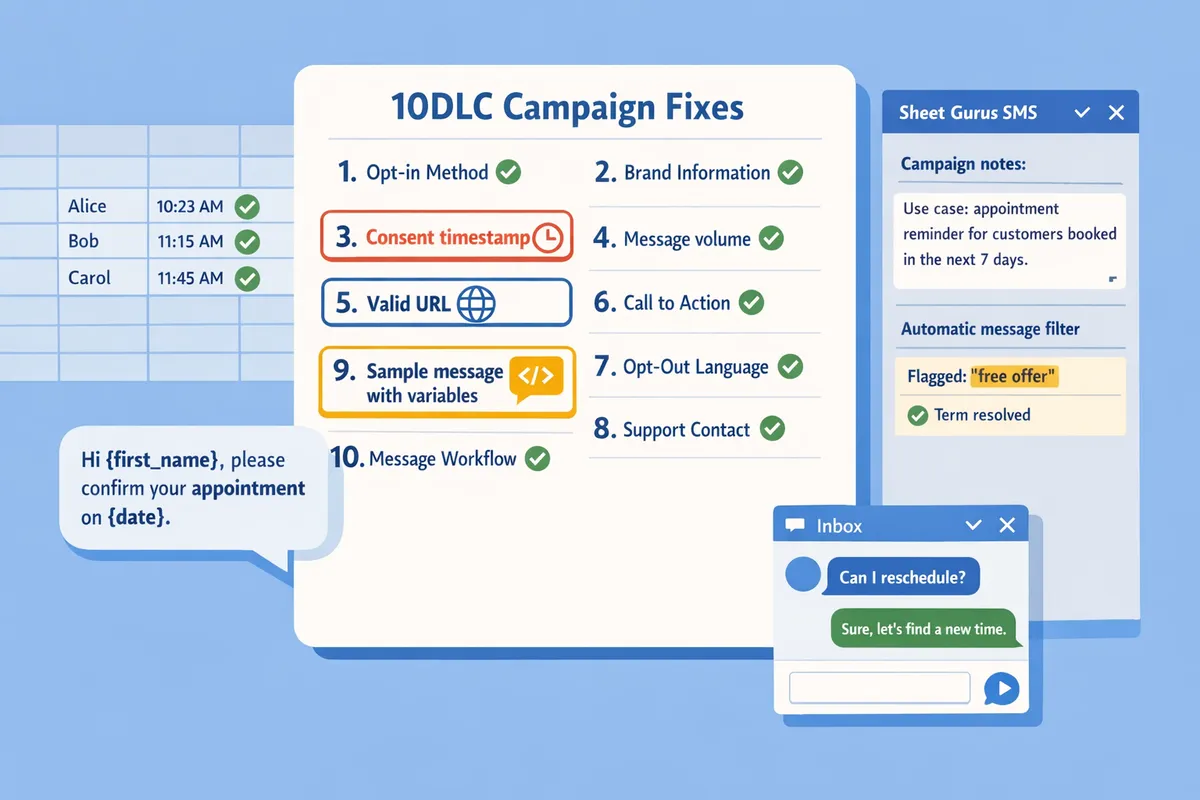
Recovering a rejected 10DLC campaign requires a structured playbook that records the exact rejection reason, fixes the evidence, and resubmits with a concise change log. Doing these steps in order reduces resubmission cycles and shortens the overall 10DLC approval timeline 2026.
Step-by-step recovery checklist 🛠️
Record the carrier error code, copy the rejection text, and capture the reviewer notes before making any changes. This prevents guesswork and gives the registrar a clear starting point for the next review. Include the carrier code, timestamp, and screenshot of the rejection in your ticket.
Follow this prioritized sequence to minimize back-and-forth and shorten the 10DLC approval timeline 2026:
- Identify the exact rejection cause (carrier code, registrar note).
- Gather missing documentation: screenshots, business license, URL screenshots, and opt-in logs. Put files into a single folder named with the campaign ID.
- Update sample messages and registration fields to match the evidence you will attach. Use Sheet Gurus SMS curly-brace variables in the samples for clarity (example: {FirstName}, {Business}).
- Validate all URLs and landing pages for visible opt-in language and working HTTPS certificates.
- Resubmit with a 3-line change log: what changed, why, and which files attach.
- Track the resubmission in a ticketing system and set reminders for follow-up at 48 and 96 hours.
⚠️ Warning: Multiple identical resubmissions without clear corrective notes increase manual review time and may trigger longer vetting. Always include a short change log with each resubmission.
Sheet Gurus SMS helps by letting you preview sample messages with dynamic variables and exporting the exact sample text you used for registration, which speeds step 3.
Ready-to-use registration and message templates 📝
Use filing-ready templates for campaign descriptions, opt-in disclosures, and sample messages so your registrar sees a consistent, carrier-ready submission. Templates cut editing time and reduce ambiguity that triggers manual review.
Registration description (use for campaign field):
‘Appointment reminders for {Business} customers. Messages confirm upcoming appointments, send reminders up to 48 hours prior, and provide reschedule links. No marketing content. Reply STOP to opt out.’
Opt-in disclosure (place on signup page and in documentation):
‘By providing your phone number you agree to receive SMS messages from {Business} about appointments and service updates. Msg & data rates may apply. Reply STOP to unsubscribe. View privacy: https://yourdomain.com/privacy’
Sample appointment message (carrier sample):
‘{FirstName}, {Business}: Your appointment on {ApptDate} at {ApptTime} is confirmed. Reply RESCHEDULE to change or STOP to opt out. Details: https://yourdomain.com/confirm/{ApptID}’
Sample delivery message (carrier sample):
‘{FirstName}, {Business}: Your delivery is scheduled for {DeliveryDate}. Track: https://yourdomain.com/track/{TrackingID} Reply HELP for support or STOP to opt out.’
Use these exact samples when registering. Sheet Gurus SMS formats messages with curly-brace variables so the sample text in your submission matches the send preview exactly; include a screenshot from the sidebar as supporting evidence. For step-by-step registration guidance, see our 10DLC registration guide for Google Sheets senders.
Decision table: fix existing campaign vs. create a new one 🔁
Edit the existing campaign when the rejection is limited to registration fields or sample message wording; create a new campaign when the use case or content category changes or when a campaign has repeated rejections. The table below helps you choose the fastest path to approval.
| Rejection cause | When to edit existing campaign | When to create a new campaign | Expected time-to-approval |
|---|---|---|---|
| Missing business docs (one-off) | Edit and attach missing docs. | Only create new if brand details change. | Edit: 2–7 days. |
| Sample message wording or missing opt-in language | Edit sample messages and reattach evidence. | Create new if use case changes from transactional to marketing. | Edit: 2–5 days. |
| URL or landing page non-compliant | Edit landing page and resubmit with screenshot. | Create new if the campaign points to a fundamentally different domain. | Edit: 3–10 days. |
| Repeated rejections for same policy issue | Edit only if you can demonstrate corrective action and new evidence. | Create new if the registrar suggests fresh filing to avoid reviewer bias. | Edit: may take weeks; New: 1–3 weeks. |
| Policy/category mismatch (e.g., prohibited content) | Not recommended. | Create new with compliant content and new campaign description. | New: 1–3 weeks. |
Use the table to document your decision in the change log. Sheet Gurus SMS can export the exact sample text and reply history to include as evidence when you choose to edit.
How Sheet Gurus SMS helps prevent and recover from rejections ⚙️
Sheet Gurus SMS reduces resubmission cycles by applying automatic message filtering, providing dynamic variables for accurate sample messages, and capturing two-way opt-out evidence in a real-time inbox. This makes your resubmission package contain the exact samples and reply logs carriers want to see.
Practical recovery steps with Sheet Gurus SMS:
- Preflight sample sends to an internal test list to generate real replies and opt-out logs for evidence.
- Use the sidebar preview to copy the exact carrier-facing sample into your registrar form.
- Pull the two-way inbox transcript to show opt-in or STOP replies as proof of consent.
Sheet Gurus SMS offers a 30-day free trial with 50 credits so you can test preflight checks and collect real-send evidence before resubmitting at scale.
For details on integrating Google Sheets sends and registration, consult our 10DLC registration Google Sheets SMS guide.
Escalation and SLA guidance for time-to-approval ⏱️
Follow a staged escalation timeline so stakeholders know realistic windows and you can minimize lost send windows. The timeline below reflects registrar and carrier review paths in 2026.
- Internal fix: address the rejection and prepare evidence within 24 to 72 hours. Capture screenshots and the original rejection code.
- Resubmit to the registrar: expect 2 to 5 business days for standard re-review. Add the 3-line change log and attached evidence.
- Escalate to the registration partner: allow 1 to 2 weeks if the registrar requests partner-level review. Include a summary email and ticket ID.
- Carrier appeal: expect several weeks for carrier-level appeals on policy or ambiguous content. Provide legal or compliance memos when required.
What to include in the change log for every resubmission:
- Field changed (exact text before → after).
- Why the change resolves the carrier note.
- Names of attached files and timestamps.
Set calendar reminders and communicate the 10DLC approval timeline 2026 to stakeholders so marketing launches and paid media spend align with expected approval windows. For compliance best practices and filtering guidance, see our SMS Compliance for Google Sheets in 2026 guide.
Frequently Asked Questions
This FAQ answers the most common questions campaign owners and compliance leads ask about 10DLC rejections in 2026. Read these concise answers to decide next steps quickly and avoid common re-submission mistakes.
How long does 10DLC approval take in 2026? ⏱️
Initial vetting typically completes within a few business days; complex campaigns that require manual review can take multiple weeks. Carriers and registration partners run automated checks first and escalate ambiguous or high-risk categories (healthcare, finance, crypto) for manual review. For example, a retail promotion with clear opt-in evidence usually moves in 2–5 business days, while a healthcare appointment flow that needs consent documentation can take 2–4 weeks. Use the 10DLC registration guide for Google Sheets senders to prepare required fields and shorten initial vetting.
What is the single most common reason for rejection? ❌
A mismatch between the declared campaign use case and the submitted sample messages or landing page is the top cause of rejections. Carriers expect the campaign description, sample messages, and any linked landing page or disclosure to tell the same story. For example, registering as order updates but submitting promotional copy will trigger a manual review. Fixes are specific: edit the campaign description to match real flows, or replace sample messages so they show the exact user journey.
Can I reuse a rejected campaign’s registration data? 🔁
You can often reuse parts of a rejected registration but not the core fields that caused the rejection. If the rejection stems from brand identity, use-case, or sample-message mismatch, creating a new campaign with corrected brand documents usually speeds approval. Reusing contact info, EIN, or consent evidence is fine when unchanged. For a step-by-step register-and-resubmit workflow, follow our 10DLC registration guide for Google Sheets senders.
How should I write sample messages for approval? ✍️
Sample messages should be short, specific, and mirror the real user flow you registered. Include the sender, clear purpose, and an opt-out instruction; use dynamic variables to show personalization. Example approved-style samples: ‘Hi {FirstName}, your order {OrderID} ships today. Reply STOP to opt out.’ and ‘Reminder: Appointment for {FirstName} on {Date} at {Time}. Reply RESCHED to change.’ Sheet Gurus SMS supports curly-brace variables like {FirstName} and {OrderID} and keeps two-way replies in a real-time inbox for consent evidence.
Will Sheet Gurus SMS prevent campaign rejections? 🛡️
Sheet Gurus SMS reduces rejection risk by filtering noncompliant language, enforcing opt-out handling, and storing two-way replies as evidence, but no tool can guarantee approval when source documents or descriptions are incorrect. Use Sheet Gurus SMS to build compliant sample text, schedule tests, and save conversational logs that carriers request during manual review. See our SMS Compliance for Google Sheets in 2026 guide for examples of pre-send checks and consent handling.
How many times can I resubmit before it escalates? 🔄
There is no fixed limit, but repeated identical resubmissions typically trigger manual escalation and longer reviews. If you receive a rejection, document the exact reason, fix the root cause, and include a one-paragraph change log with each resubmission. Manual escalation often follows when reviewers see repeated unaddressed issues.
💡 Tip: Always include a concise change log (what you changed, why) when resubmitting; that cuts repeated-review time.
What documentation do carriers require for A2P 10DLC? 🧾
Carriers generally require verifiable business identity, a clear campaign use-case description, representative sample messages, reachable disclosure and opt-out URLs, and evidence of user consent. Evidence can be sign-up records, consent checkboxes with timestamps, or preserved two-way opt-ins. For senders using Google Sheets workflows, our post on 10DLC registration for Google Sheets senders outlines the exact fields carriers expect and one common carrier setting that trips users.
Immediate steps to fix 10DLC campaign rejection reasons 2026.
Prioritize the top fixes: confirm brand and campaign registration, clean message templates, document consent, and file appeals for false positives. Reviewing carrier rejection codes first shortens recovery time and reduces lost sends. For background on verification and carrier rules, see our A2P 10DLC overview and the 10DLC registration guide for Google Sheets senders. Also review SMS Compliance for Google Sheets in 2026 for pre-send checks and testing plans.
Sheet Gurus SMS is a Google Sheets add-on for sending bulk SMS from a sidebar rather than spreadsheet formulas. Personalize each message with curly-brace variables such as {FirstName}, handle replies in a real-time two-way inbox, and rely on automatic message filtering to help keep your sends compliant.
💡 Tip: Test one small send using the sidebar, inbox, and automated filtering before scaling your campaign.
Create your first compliant campaign with Sheet Gurus SMS by starting a 30-day free trial with 50 credits and follow the getting-started guide to send a test message. Example template: ‘Hi {FirstName}, your pickup is at {Time}. Reply STOP to opt out.’ Subscribe to our newsletter for recovery playbooks, template updates, and appeal templates.